Instagram Threads App is a new app which is built by the Instagram team for sharing text updates and joining public conversations. It is a newly launched app released on June 27, 2023, and the Instagram team is still working on Instagram Threads App to make it compatible with open, interoperable social networks.
Mark Zuckerberg has just announced the initial version of the Threads app. Whether you are a creator or a casual poster, Threads provide you with a platform for separate space for real-time updates and public conversations.
You can check out our other articles: Redmi Note 11 Pro Price in Nepal || Dell Vostro 3400 Price In Nepal
Who should we consider the owner?
It is really a tough question to answer about the owner of the Threads app. Let me tell you why in some steps and make it clear who can be considered as the real owner of Instagram Threads App.
- Actually Threads App is officially made by the Instagram app. If you go over Play Store to download this app, you will see their Instagram as the owner of the app. Play Store always needs the owner’s details to upload applications for users’ privacy and security. And Instagram Threads App is officially uploaded with the ownership of Instagram.
- As we all know that Instagram is officially a social media company of Meta, a renowned company. So, here we can also say that Meta is the owner of the Thread company as it is the head branch of Instagram too.
- Here comes the third phase, Meta is owned by Mark Zuckerberg(CEO of Meta company). So, who should we consider as the owner of the Instagram Threads App?

It’s not really a tough thing to say as most people would probably say it’s obviously Mark Zuckerberg but what if we talk about the company? Which company owns the app? Is it Instagram or Meta? So, here I would like to say Instagram.
Instagram or Meta: Who is the owner?
I know what you are gonna say after reading the above thing. But the fact is, the Instagram company is the real owner of the Instagram Threads App.
Instagram is not the real property of Mark Zuckerberg and he is not the founder of it either. Instagram was created by Kevin Systrom and Mike Krieger. Then later Meta bought it. You can check out the question: Who is the owner of Instagram? It will prompt you with an answer i.e. Meta.
Instagram is itself a separate company so it’s better to say that Instagram Thread App is owned by Instagram as officially written in Playstore.
How to get started with Instagram Threads App?
- Open Threads App.
- Threads will automatically recognize your logged-in Instagram account.
- You can import your Instagram details into the Threads App and start.
- Or, you can manually fill in all the details.

What you can do with Instagram Threads App?
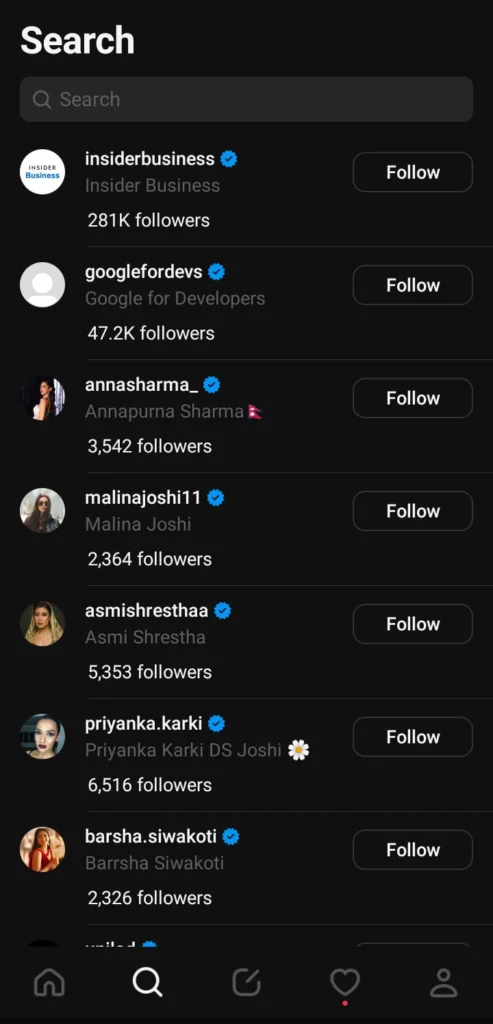
- Access your Instagram followers
Your Instagram username and verification badges are reserved for you. Automatically follow the same accounts you follow on Instagram in a few taps, and discover new accounts too.
Threads App has already got a username reserved which has been used in your Instagram. So, you are going to get the same username as Instagram. This feature could be loved by most users. Analysts have really used their business minds over there. Nobody would love to have several usernames on different platforms and remember all of those.
- Share your point of view
Spin up your new thread about what’s on your mind. This is a space to be yourself, and you control who can reply.

- Connect with friends and your favorite creators
Jump to the replies to get in on the action and react to commentary, humor, and insights from the creators you know and love. Find your community and connect with people who care about whatever it is you’re interested in.
- Control the conversations
Customize the settings and user controls to manage who can see your content, reply to their threads, or mention you. Accounts you’ve blocked will be carried over from Instagram, and they are enforcing the same Community Guidelines to help ensure everyone interacts safely and authentically.
- Find ideas and inspiration
From TV recommendations to career advice, get answers to your questions or learn something new from crowd-sourced conversations, thought leaders, and industry experts.

- Never miss a moment
Stay on top of the latest trends and live events. Whether it’s about new music, movie premiers, sports, games, TV shows, fashion, or the latest product releases, find discussions and receive notifications any time your favorite profiles start a new thread.
- Open social networking – Coming Soon
In the future, there will be ways to discover more content and reach wider audiences.
Note
Does Instagram Threads App have security?
Don’t worry! Instagram Threads App doesn’t sell or steal your data. But it needs some permissions to be granted from your device. Here are some of the few things in your device which are accessed by the Threads App.
- Location
- Microphone
- Identity
- Contacts
- Photos/Media/Files
- Wi-Fi Connection Features
- Camera
- Storage
- Receive data from the internet
- Part with Bluetooth devices
- Run at startup
- Draw over other apps
- Prevent the device from sleeping
- View network connections
- Reorder running apps
- Use accounts on the device
- Control vibration
- Control audio settings
- Full network access
Data shared
- Name
- Email Address
- User Ids
- Phone Number
- Device or other ID
Data Collected
- Location (Approximate and Precise Location)
- Personal info (Name, Email Address, User IDs, Address, Phone Number, Political or religious beliefs, Sexual orientation)
- Financial information( User payment info, purchase history, credit score)
- Health and Fitness Info
- Messages
- Photos and Videos
- Audio
- Files and Docs
- Calendar
- Contacts
- App activity
- Web browsing
- App info ( Crash logs, Diagnostics)
Now you might be thinking that it is really safe after seeing that Instagram Threads App is collecting these numbers of data from us. Like other social media apps, it also collects data to optimize its system so that you will get the best user experience.
You can check out our other articles: Benco S1 Price in Nepal || Redmi Note 11 Price in Nepal
Conclusion
We are online in Instagram Threads App too, So do follow us over there. Click here to follow.
Leave a Reply