Canva is a very popular graphic design platform that allows us to create social media graphics, presentations, posters, documents, and other visual content.
The Canva is a very easy-to-use platform when it comes to designing. Now wide number of people are searching for how to get Canva Pro in Nepal online a lot.
Don’t worry! Here we have come up with some exciting content for you that can help you to enjoy premium templates and features at low prices.
What is Canva Pro?
Canva provides a free plan as well as a premium plan. Here’s a breakdown of Canva and Canva Pro in Nepal.
In Canva Free, you get to see a great option for normal users or those who are on a budget.
It offers a wide selection of free templates, photos, and design elements. You can create and save different kinds of designs for free.
In Canva Pro, you will get access to millions of premium photos, videos, audio, graphics, and elements.
Not only that, it also provides features like Brand Kit for consistent branding, background remover for easy photo editing, and resize magic to adapt designs to different formats.
If you want to collaborate with teams in your industry or company, then it allows team collaboration on designs.
Let us say that Canva Pro is ideal for businesses, professionals, or anyone who needs more advanced design features.
Having all these features, obviously, anyone would like to get Canva Pro to build their business.
What is the cost of Canva Pro in Nepal?
Canva comes up with three different plans for casual users to enterprise-level users.
Here, you can see the pricing plan in the table with Canva Pro features.
SN
Plan
Features
Price
1
Free
Easy drag-and-drop editor, 1M+ professionally designed templates, 1000+ design types (social posts and more), 3M+ stock photos and graphics, AI-generated writing and designs, Design printing and delivery, 5GB of cloud storage
US $0/year for one person
2
Pro
Unlimited premium templates, 100M+ photos, videos, graphics, audio, 100 Brand Kits to manage your brand, Quickly resize and translate designs, Remove backgrounds in a click, Boost creativity with 20+ AI tools, Plan and schedule social content, 1TB of cloud storage, 24/7 customer support
US$120/year for one person=NRs. 16,000/year
3
Teams
Scale your brand and centralize assets, Ensure brand consistency with approvals, Edit, comment, and collaborate in real-time, Generate on-brand copy with AI Team reports and insights, Pay as you grow1TB of cloud storage, 24/7 customer support, AI Admin Controls, ISO 27001 certification and SOC2 type I compliance
US$100/year per person=NRs. 27,000/year
Canva Pro and Team Features
How to get Canva Pro in Nepal online for free?
Canva itself provides a free plan with a good range of features but also has a premium plan called Canva Pro that unlocks additional benefits.
You may get different types of Canva Pro Mod APK versions through websites. But legally, you cannot get Canva Pro in Nepal for free.
But here we are going to provide Canva Pro at a low cost. Read the article to know more about it.
How to get Canva Pro in Nepal at a cheap rate?
You can see that different pages on Facebook offer Canva Pro in your email.
But many of them may not be genuine. Actually, it’s the Canva Education Plan which is like the Canva Pro plan.
They will add you to their team so that you can use different kinds of premium features.
You can also get those features with us at NRs. 200 per year. Please feel free to contact our admin to get premium features in your email.
The question for every Nepalese person is: how to use TikTok in Nepal after ban? As per the press conference on Monday by Rekha Sharma, TikTok is officially banned in Nepal. On November 13, 2023, TikTok was banned in Nepal.
Here in this article, you will learn the best ways to access your TikTok even after getting banned. It is 100% working so don’t forget to check out how to use Tiktok without a VPN at the end.
Are TikTok bans permanent?
Rekha Sharma says, “Considering how TikTok is disrupting our social harmony and the impact it’s having on our family and social structures, the cabinet has decided to ban TikTok for the moment.”
Rekha Sharma’s statement suggests that the government is unsure about outright prohibiting TikTok. Our Nepalese government has taken this step so that they can eradicate the impact on our society.
Similarly, on Tuesday, Nepali Prime Minister Pushpa Kamal Dahal defended the decision at an event in Bhaktapur.
He said, “After a long discussion on how to control the swing to spread disharmony, disorder, and chaos in society, a consensus was reached among all political parties, including both the ruling party and the opposition.”
Is TikTok banned in Nepal?
After the official notice from the government about TikTok being banned in Nepal, Purushottam Khanal, a chair of the Telecommunications Authority, has asked the ISP to cut access to the app.
WorldLink Communications, one of the highest-paying ISP companies in Nepal, has followed the order, and other internet providers are expected to follow soon, according to the report.
Why is TikTok banned in Nepal?
Over 1,600 cases of cybercrime connected to TikTok have been reported in Nepal during the past four years, according to a report provided by the local medical association and other sources.
TikTok is an app built to show hidden talents in a short time. In recent years, this app has contributed a lot to cybercrime.
Three years ago, one of the neighboring countries of Nepal, India, had also banned TikTok. The reason behind the TikTok ban in India was major security threats happening to the Indian government.
The Indian government had claimed that TikTok was stealing important data and information from their system. After TikTok was banned in India, it had a positive impact on the social structure.
After the success of India in banning TikTok, the Nepalese government is trying to ban it too.
How to use TikTok in Nepal after ban?
Using VPN
Here, VPN stands for “Virtual Private Networks”. It establishes a protective network while connecting with the public networks.
Basically, it was created to protect you from hackers and scammers. When you are sending data to others using public networks, unauthorized people can access your traffic.
By using a VPN, you can protect your sensitive data safely while transmitting. You can change your location and IP address.
Here is how you can use a VPN to open TikTok after the ban in Nepal:
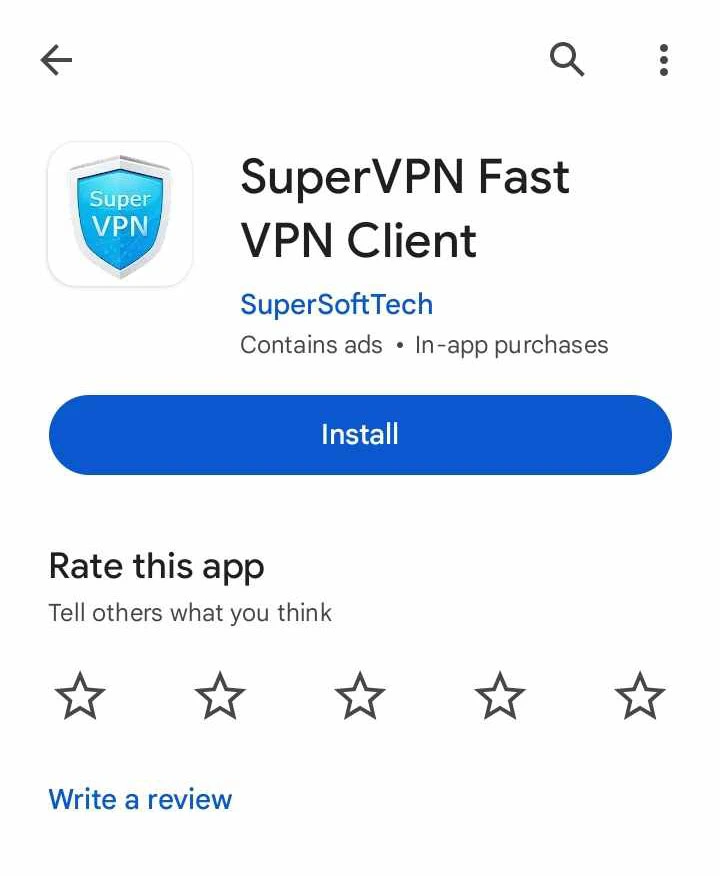
Go to the Android Play Store and download the SuperVPN Fast VPN Client.
After downloading, you can open the app. You can see some ads; you can just ignore them.
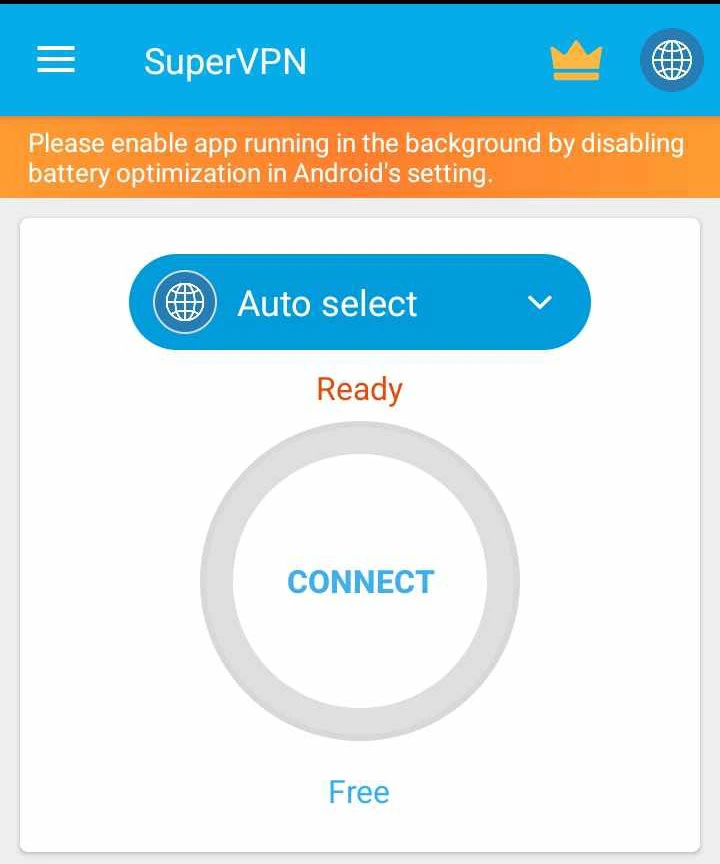
Then you need to select the country by clicking on the drop-down menu labeled Auto Select.
Then click on Connect, and then click on OK.
After taking some time, it will display the message “Connected”.
Use TikTok with a VPNUse TikTok with VPN 1Use TikTok with VPN 2Use TikTok with VPN 3Use TikTok with VPN 4Use TikTok with VPN 5
After this, if you open the TikTok app again, it will start working as usual.
Note: This method works both for the TikTok mobile app and website.
Changing DNS
DNS stands for “Domain Name System”. DNS changes our domain name, i.e., website name, to IP addresses and allows our browsers to get access to websites and other Internet resources.
Every device on the Internet has a unique IP address, which you might use to locate it.
Here is how you can change the DNS of mobile data and wifi in Nepal.
Go to Settings.
Then click on More Connections.
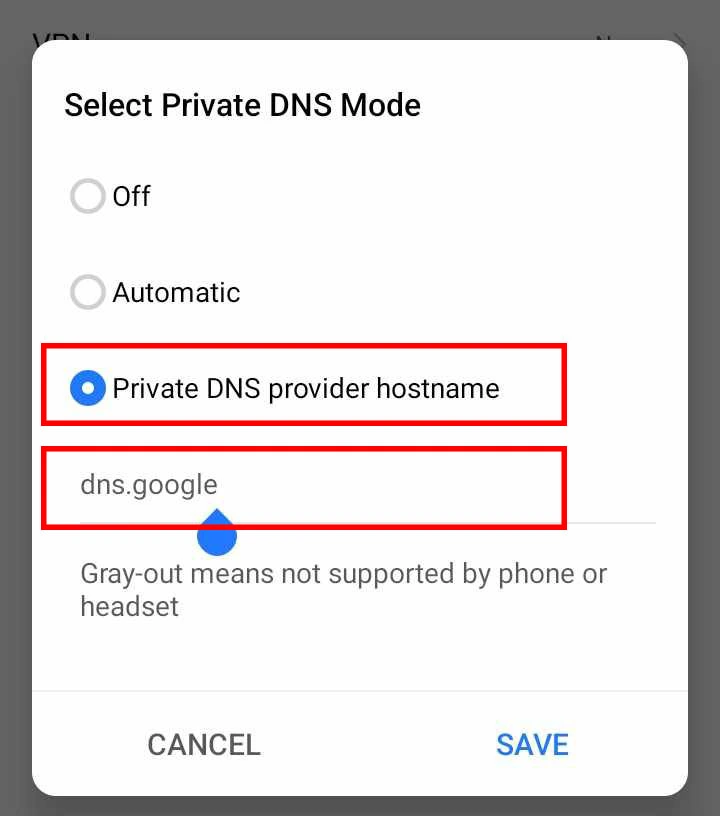
Choose a private DNS.
Then choose the private DNS hostname option.
Then type the DNS you want to use, like dns.google for Google DNS and dns.cloudfare for Cloudflare DNS.
Now, you can use TikTok in Nepal with mobile data and Wi-Fi.
Change TikTok DNS in Nepal 1Change TikTok DNS in Nepal 2Change TikTok DNS in Nepal 2
Adding VPN manually to the device
You can also use VPNBOOK to add a VPN to your device manually. You need to open vpnbook.com. This works in Nepal, too.
At the top, you can see FreeVPN. Click on that, and you can see a list of server addresses with usernames and passwords for different locations.
Here are the steps on how you can add a VPN to Android in Nepal.
Search for VPN in your mobile settings. And click on that.
Type the name you want for your VPN.
Type the server address.
Then enter the server’s username and password.
Click on the Add or Tick button.
After that, connect to the VPN.
You will get a message displayed as “Connected”.
Note: This may not work for most of the devices.
Add TikTok VPN
What are the risks of using TikTok after a ban?
When somebody is not giving you something and you take that thing without permission, then that’s called stealing. Obviously, stealing is illegal in any country.
Free VPN Risks
Using a VPN is good for the safe transmission of information over public networks. However, a free VPN has a lot of risks.
If you are buying the VPN at some cost, then you can use it without any hesitation. But if you are using it for free, then here are the 6 risks involved in using a VPN in Nepal:
A free VPN won’t make you completely anonymous.
Your privacy isn’t guaranteed.
Using a VPN for an item that has been banned is illegal.
VPNs slow down your internet connection.
Using a VPN increases mobile data usage.
You can be affected by malware and phishing attacks.
2. Changing DNS Risks
The ISPs in every country provide a default DNS. But you change DNS as per your requirement.
Changing DNS can help you get connected to several services. Recently, due to TikTok being banned in Nepal, many people have changed their DNS to use the app.
Here are the risks involved in changing DNS in Nepal:
A custom DNS server may not detect or block phishing sites as effectively as an ISP DNS server. You may have to face phishing sites after changing DNS.
A custom DNS server may not be able to detect or block malware-related domains as effectively as an ISP DNS server. You may have to face malware after changing your DNS.
Through a DNS server, they could potentially redirect you to a spoofed version of the website, tricking you into entering sensitive information.
A custom DNS can collect your logs and information about online activities.
After knowing all these, you should have to use TikTok, as it is officially banned in Nepal. You may not know when your data has been collected.
Please take this topic, “TikTok Banned in Nepal,” seriously, and don’t use any kind of illegal method to use TikTok. Our safety matters a lot in this society.
Your sensitive data, like passwords, bank accounts, and others, will be at risk.
Frequently Asked Questions
Is TikTok banned in Nepal?
As per our Telecommunication Minister Rekha Sharma and Prime Minister Pushpa Kamal Dahal, TikTok is officially banned in Nepal. This news was published on Monday evening through a press conference called by Rekha Sharma.
How can I use TikTok in Nepal after a ban without a VPN?
You can use private DNS for TikTok in Nepal after a ban without a VPN. You can make more connections. Then go to the private DNS. Choose the private DNS hostname option. Type your desired DNS over there, like dns.google, and click OK.
Is VPN illegal in Nepal?
According to Nepalese law, it doesn’t prohibit anyone in Nepal from using Virtual Private Network. But the Electronic Transaction and Digital Signature Act of 2004 criminalizes any online behavior as hacking or fraud, including the use of any illegal websites or apps, which is good.
Which country banned TikTok?
The countries like Nepal, India, Afghanistan, Malaysia, and Somalia. Nepal is the latest nation to ban TikTok as of November 13, 2023.
Which is the best VPN in Nepal?
The best VPN in Nepal is SuperVPN. If you are willing to access some websites and manage your anonymity, then SuperVPN is good for you.
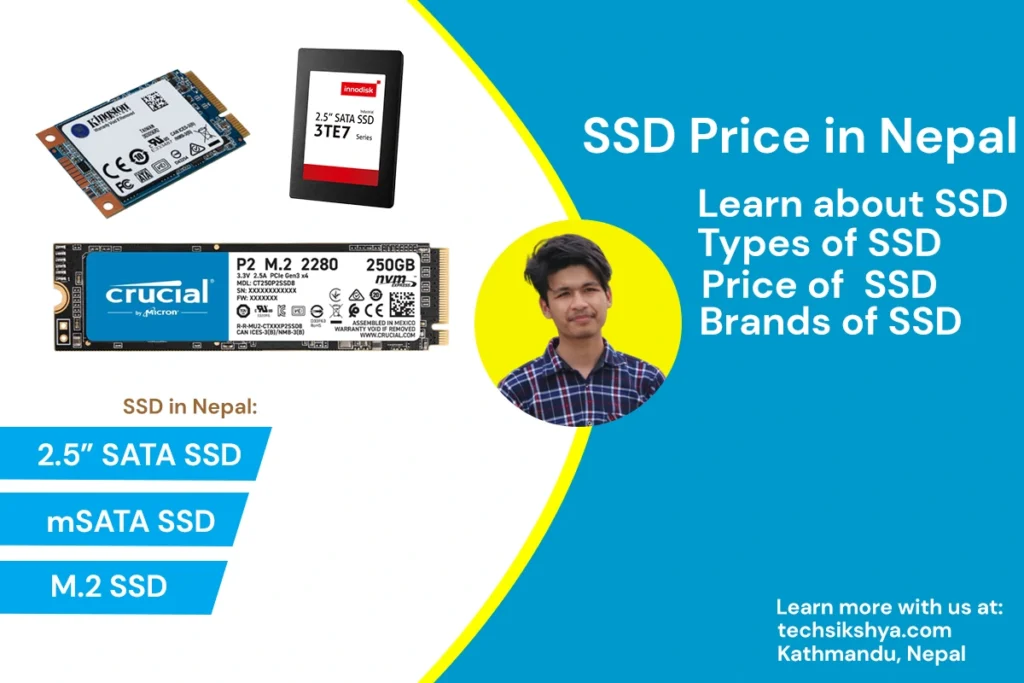
SSD Price in Nepal is the most frequently asked question when it comes to upgrading the computer’s overall performance. Why should you choose an SSD? SSD (Solid State Drive) is small, fast, and has a lower failure chance compared to HDD (Hard Disk Drive).
If you are looking to upgrade your system’s performance, an SSD is one of the best options. Without going too late, let’s dive into the article about SSD price in Nepal and their types and brands.
SSD Price in Nepal
There are a variety of questions that come to mind whenever we are buying an SSD in Nepal. Before knowing about different types of SSD specs and features, let us know their prices in Nepal.
SSD Price in Nepal
Consider These Things Before Buying SSD in Nepal
SSD has a wide range of contents to be well aware of. When we are buying, there are lots of things that we must know. Here, we will help you learn about several factors before buying an SSD in Nepal.
SSD Price in Nepal start with a 2.5” SATA SSD. The most common type of SSD you will find on the market is a 2.5” SATA SSD. They have a similar form factor to a 2.5” HDD and perfectly fit your mechanical hard disk drive. With this SSD, you can achieve a maximum speed of up to 600 MB/s.
Buy 2.5-inch SATA SSD
The main objective of this SSD Price in Nepal article is to help you know the standards for the SATA connectors, and you have to pay attention to the compatibility of your drive and SSD. For instance, SATA III is faster (6 Gbps) compared to SATA II (3 Gbps).
This is mainly used on desktops and is slightly bigger and thicker than other SSDs. SSDs come in different thicknesses. The most common thickness is 7 mm, but you may also find SSDs that are 9.5mm or 12.7 mm thick.
If you do a speed test on the workings of this drive, you will find out how fast these devices are. This SSD works well with things like booting Windows 10, working on different applications like Photoshop, Illustrator, etc., and playing games.
Pros of 2.5” SATA SSD
Less costly and easier to find.
It is easier to remove and replace M.2 drives as they are kept separate from the motherboard. You don’t have to work around your graphics card or other components you currently have connected if you’re connecting your current rig.
Cons of 2.5” SATA SSD
This SSD has a slower speed in comparison to SSDs with NVMe.
They are bulkier than the M.2 form factor.
2.5” SATA SSDs need a SATA data cable connection and SATA power cable, which can increase cable cutting
mSATA SSD in Nepal
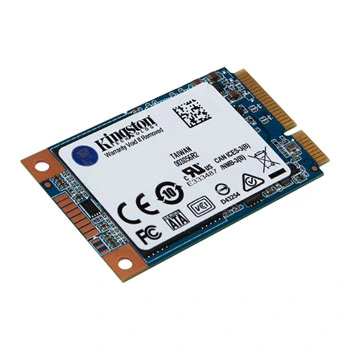
Here, mSATA refers to the mini SATA. These SSDs are smaller and fit the M.2 slot. If we talk about the price of this SSD in Nepal, then this might be slightly more expensive than 2.5” SATA. But with a higher price than the 2.5” SATA price in Nepal, it gives almost the same speed.
Buy mSATA SSD
These SSDs are more common on portable devices such as laptops, tablets, and notebooks.
Pros
lower power consumption than a standard SSD.
Shock and vibration resistance.
Fast boot and shutdown capabilities.
Cons
It used to have low storage, from 32GB to 64GB but now it has extended up to 1TB.
Costlier than other forms of SSD when comparing SSDs of the same size.
Same speed, although the price is higher than other regular SSDs.
2.5” SATA and mSATA SSD Price in Nepal
SSD Price in Nepal is a major question when buying these products. We already have details about the performance and details of both kinds of SSDs. Here is a brief list of SSD prices in Nepal, depending on the types of form factors.
Note: The 128GB SSD, 256GB SSD, 512GB SSD, and 1TB SSD prices in Nepal may vary according to the e-commerce sites and retail stores. To make more profit, local shopkeepers may sell at more prices too.
M.2 SSD Price in Nepal
M.2 SSD comes in various forms and sizes. They are either 22 or 30mm wide and will vary in length from 16mm to 110mm in 2022. You’ll see them as 2280, 1630, 3030, and so on, sold in the market. Here, the first two digits represent the width and the last two or three digits of M.2 represent the length of the device.
Buy M.2 SSD
What does M.2 or 2M look like? M.2 SATA SSDs have two U-shaped cutouts or “keys,” near the edges, which are also known as the “M” and “B” keys.
How fast is M.2? Modern motherboards are equipped with dedicated M.2 slots so you don’t have to consume SATA slots. Oftentimes, M.2 slots will support both M.2 SATA and M.2 NVMe SSDs. Here, the SATA bandwidth is slower than that of NVMe. Both are the types of SSD that come inside the M.2 form factors in Nepal.
Note: Before changing the SSD, make sure you check the motherboard and find out what kind of SSD is supported by your PC or laptop.
Pros:
Significantly faster data transfer rate than 2.5” SSDs.
It can be installed on any motherboard supporting the M.2 interface, which is quite common.
Smaller than 2.5” drives. And it is only as thick as a stick of chewing gum.
They clip directly into the motherboard. So we don’t need more space for SATA cables.
Cons:
M.2 SATA SSDs are slower than NVMe SSDs.
All the motherboards do not support M.2 connectors.
Little more expensive than 2.5” SATA SSDs.
M.2 SSD Price in Nepal
Note that M.2 SSDs are available in 128GB M.2 SSD, 256GB M.2 SSD, 512GB M.2 SSD, and 1TB M.2 SSD. These prices are available below in the table:
If you are still using devices or laptops with HDDs, I am pretty sure that you are facing slow performance. The HDD is giving you a lot of errors. Your applications often stop responding. You have difficulty doing your daily tasks.
Is SSD better than HDD?
The only advantage of HDD over SSD is getting more space on a smaller budget. Otherwise, HDDs have been a traditional storage device for our computers. Now, you need to upgrade your computer from an SSD to an HDD.
SSD VS HDD: Which one is better?
SSDs are a good choice to begin with, as you are having a lot of problems with your HDD storage. After you start using an SSD, you will find a huge difference between using an SSD and an HDD. SSDs are fast storage devices in terms of speed. A State Drive is much smaller than a Hard Disk Drive and considerably consumes less power.
While SSD is not cheap compared to HDDs, compared with their speed and boost in performance, this is an ideal option for all modern computers. Even your old computer will speed up faster than your new computer with the same storage capacity on an SSD.
To help you decide about choosing an SSD, we have written this article about SSD Prices in Nepal and the most compatible SSD for your laptop.
Where can we buy SSD in Nepal?
After knowing all the things about the SSD Price in Nepal, now you might be wondering where you can find the SSD at the best prices. There are different choices for searching the SSD in Nepal depending upon your situation.
If you will go to different kinds of shops around your place then they are certainly going to charge extra money for changing the SSD or upgrading your SSD. You will get the best deal if you know how to change SSD by yourself.
Best SSD in Nepal and Where Can We Find Them? The best SSD depends upon your computer whether it supports those SSD of the best quality or not. Every device has separate support for SSD. You can find the best deals in e-commerce stores such as Daraz.
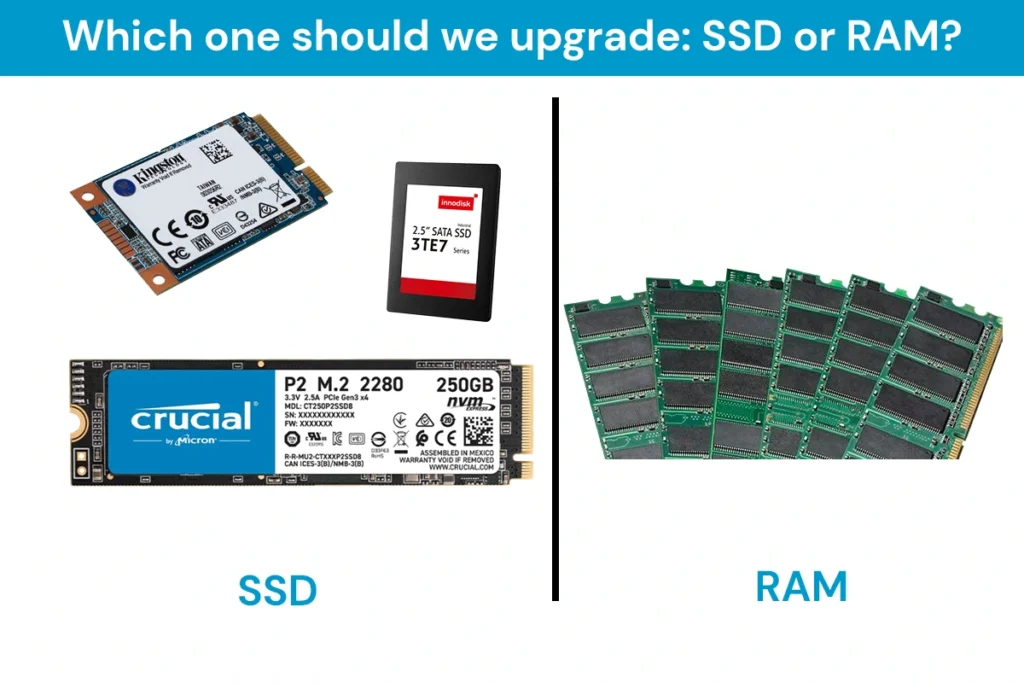
Which one is better to upgrade: SSD or RAM?
Here let us have a comparison between SSD and RAM. If we talk about the overall details of both technologies, then they are completely different from each other. SSD is a storage device used as permanent storage and RAM is used as temporary storage.
SSD VS RAM: Which one should you upgrade?
Many peoples are confused about choosing between SSD and RAM. RAM was an option in the past when there were no SSDs. Now, you probably should have to go with SSDs from my experience.
Should I upgrade RAM or SSD?
From my experience, you should have to better go with the SSD because they consume less power and are faster. RAM is a reason for faster speed but if you want a better speed at a low budget then SSD must be upgraded.
SSD costs as much as RAM and increase the overall performance of the devices more than RAM too.
Which one is better: the512GB SSD or the 1TB in Nepal?
Let me tell you that both SSD will give you the same speed overall. Because the difference between the 512GB SSD and 1TB SSD is their storage capacity only. Otherwise, they have got the same speed. So, choose these SSDs depending on your storage need only.
Conclusion
In overall conclusion, I can only say that if your motherboard supports M.2 SSD then you can upgrade to it. Otherwise, you can upgrade your HDD with SATA SSD which fits into your device. From my experience with SSD combines with Celeron N4000, SSD is the best choice when we want to upgrade our devices.
SSDs are going to give a new life to your laptops and desktop computers.
Frequently Asked Questions
Which is the cheapest SSD in Nepal?
The cheapest SSD in Nepal is ZILLION SATA SSD which costs a range of NRs 3000 to NRs. 13,000 depending upon the size. The 128 GB SSD price in Nepal is NRs. 3000, 256gb SSD price in Nepal is NRs. 4500, 512gb SSD price in Nepal is NRs. 7800 and 1TB SSD Price in Nepal is NRs. 13,000.
Other SSD prices in Nepal are higher than this as they provide better transfer speeds and better quality of speed to the users. But don’t worry these laptops are also good to go with your daily work.
Should I upgrade RAM or SSD for gaming?
SSD makes the computers fast but RAM is also equally needed for gaming for handling the cache produced during gaming. It is always good to get a RAM of 16GB before upgrading your SSD for good gaming performance. I have upgraded my laptop with an i3 processor with 512Gb SSD and 16GB. It handles the work very efficiently. I can play games and do other basic tasks on my computer at the same time.
How much RAM and SSD do I need?
RAM and SSD depend upon your choice. For a normal user like me who does some programming and writes content, 4GB RAM and 128GB are enough. But if you want to do high-performing tasks like using heavy IDE then upgrading to 8GB is the best option. Similarly, if you want to do gaming then upgrading to 16GB RAM with the same amount of SSD is the best option. But you will need an extra HDD to support your storage in this setup.
If you are still using HDD to complete your daily tasks then upgrade it to SSD because SSD is going to boost your system performance. The transfer rate of your file is going to reach another level. Our computer will start to work at a sonic speed i.e it will be fast enough to increase your productivity and performance.
Now finally, the time is coming. The Government of Nepal has finally announced the publishing of the NEB Class 12 Result. Here, you can get to know how to check class 12 result 2080.
NEB Class 12 Exam 2080 started on 26th Baisakh 2080 and ended on 5th Jestha 2080. After that many students will pursue careers in different fields of interest. Many of you are trying to go abroad to study.
Don’t know about your future but now you are probably thinking about your class 12 result. And I know you want to know how to see the NEB class 12 result 2080.
So, here is our article on How to Check Class 12 Result 2080 to help you find your NEB class 12 result 2080 with a mark sheet.
When will Class 12 results 2080 publish?
Since a few days back the news has gone viral on the news channel that the government will publish class 12 results 2080 at the end of Shrawan month. This news is 100% true.
Before knowing how to check class 12 results, let us know why we should expect NEB Class 12 results at the end of Shrawan month. According to the NEB Official, they have already finished and started to enter the marks into the database for the result-making process.
We are sure that the government is going to publish the result soon as told in Shrawan Month as per the official source. Let us wait and think positively about the NEB Result 2080.
Please note that:
If there is any technical error, the result date might be postponed. The result could be published in the first week of Asar week.
How to Check Class 12 Result 2080 By SMS?
Different official organizations deliver the class 12 result every year. But there are a few organizations chosen by NEB for delivering the result quickly. Others deliver the result just for the traffic.
You can check your class 12 result by sms through:
Aakash SMS
Sparrow SMS
Ways for How to Check Class 12 Results Through SMS
How To Check Class 12 Result By Aakash SMS?
Checking your NEB Class 12 result has been pretty easy since AakashSMS started to deliver the result in the past. AakashSMS is cheap and an easy means for getting your GPA fast on your mobile phone.
To check class 12 results by AakashSMS, you can:
Go to your mobile’s message box.
Compose a new message.
Type NEB <space> symbol number.
Send an SMS to 31003.
If your symbol number is 123456 then type ‘NEB 123456’ and send it to 31003.
After that, you will receive a text of your results.
Please note that:
NEB Class 12 Result will take a bit of time to become online as they have to upload the database first. But you can get there fast with SMS.
How To Check Class 12 Result By Sparrow SMS?
Along with Aakash SMS, another organization is also giving service to view NEB class 12 result 2080. Sparrow SMS was also popular with most of the students in the past.
Let’s see how to check class 12 result 2080 by sparrow sms. Here are the steps:
Go to your mobile’s message box.
Compose a new message.
Type NEB <space> symbol number.
Send an SMS to 35001.
If your symbol number is 123456 then type ‘NEB 123456’ and send it to 35001. After that, you will receive a text of your results. If you want you can even check your class 12 result 2080 with marksheet online.
Please note that:
Please check your NEB Result 2080 after the result is published.
How To Check Class 12 Result 2080 with marksheet?
The limitation of SMS is too irritating for most of the students. Like they can see the GPA but can’t get the grade and GPA of every individual subject together at a place.
So there’s an answer on how to check class 12 result 2080 with a mark sheet. There are some websites like neb.gov.np results-official website of NEB and neb.ntc.net.np results-official website of NTC. These websites help the students to view mark sheets online. Let me write down the websites in the list:
If you view these websites now. Then you might get different results which you have not expected. So, check these websites after the NEB 12th class result 2080 has been published.
How To Check Class 12 Result with neb.gov.np?
The majority of the students may be concerned about checking the class 12 result with a mark sheet. Here neb.gov.np website helps you to check class 12 results online.
Here are a few steps about how to check class 12 results online with the neb.gov.np website.
Click on the Search Button and the result will appear on your screen.
With these above steps, you can check the result of class 12 online with a marksheet.
neb.gov.np Official Page
How To Check Class 12 Result with neb.ntc.net.np?
Nepal Telecom has also created a website of theirs to check the NEB results online. They have seen your question on Google or any search engine about how to check class 12 results.
Let us know how to check class 12 results with neb.ntc.net.np. Here are the steps:
Now enter the symbol number and date of birth of the student.
The result of class 12 students will appear on the screen.
You can download a copy of the online mark sheet and print it for future purposes.
neb.ntc.net.np Official Page
Please note that:
You can collect a character transfer certificate from the college. You can collect provisional certificates and migration certificates with a marksheet from the NEB office located around your college.
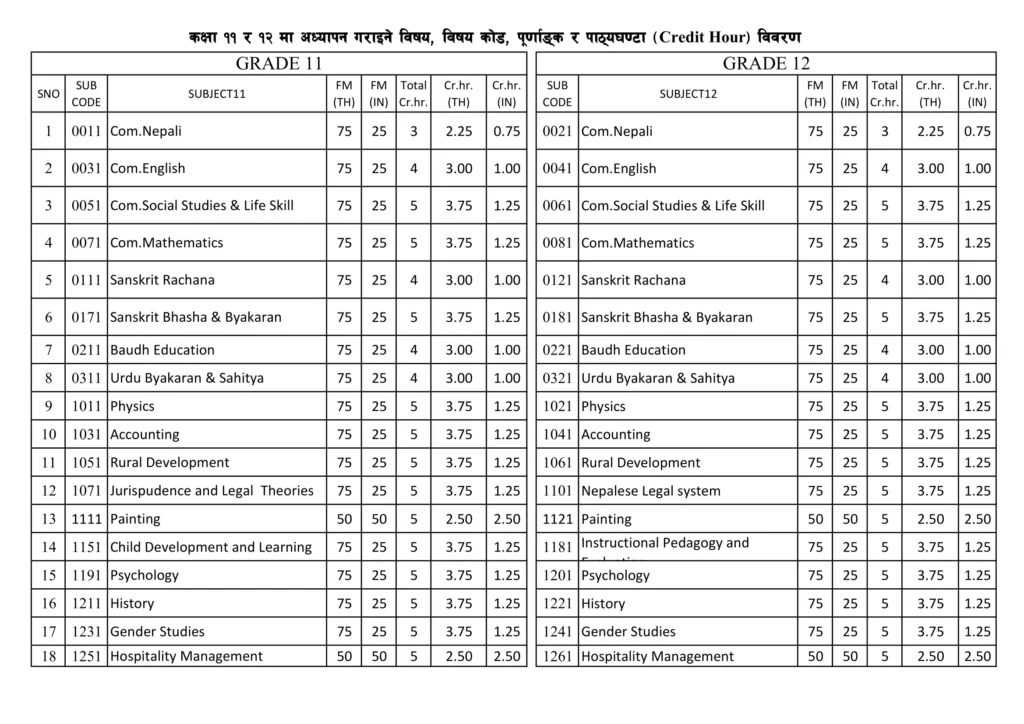
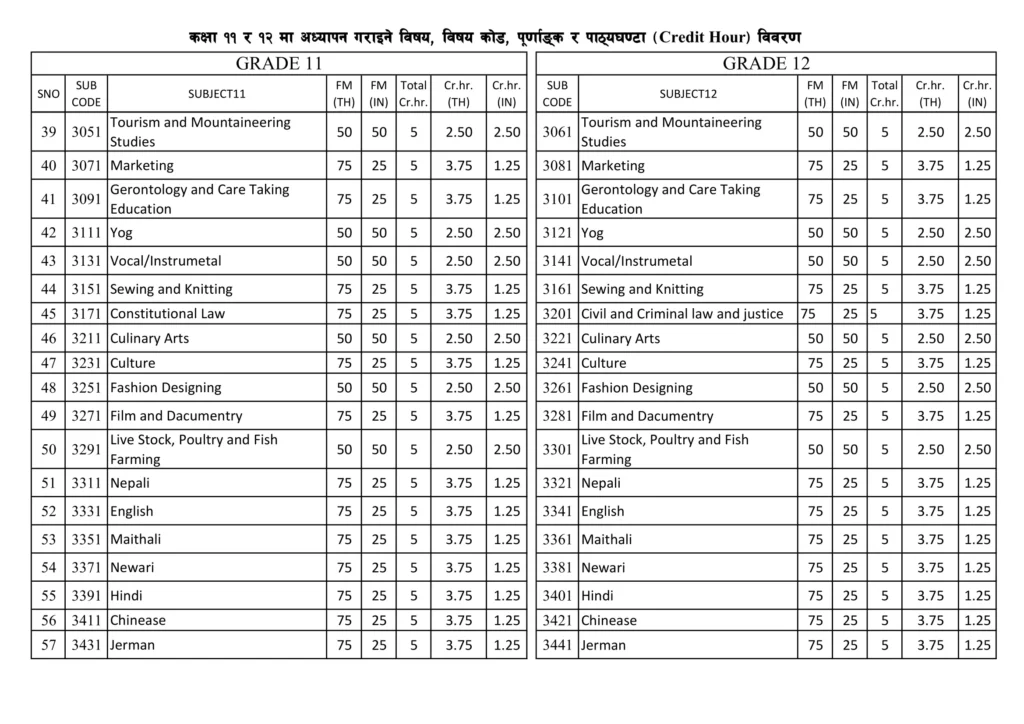
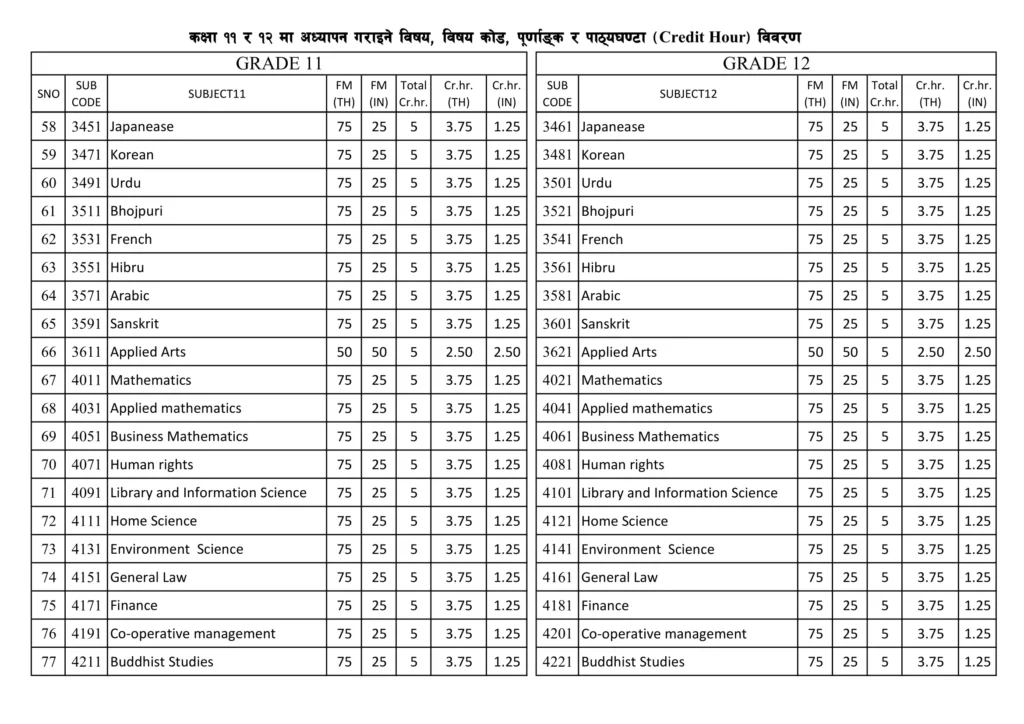
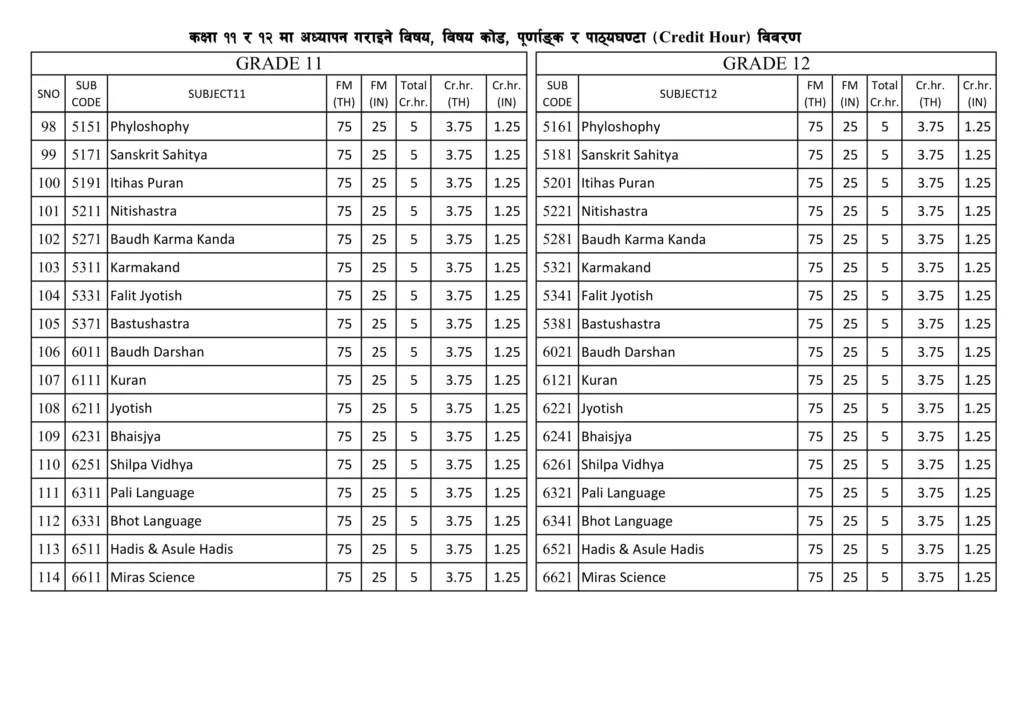
How to calculate the GPA of class 12?
After knowing how to check class 12 result 2080, you might want to know how to calculate the GPA of class 12. So here is a formula to calculate the GPA of class 12.
Decreasing your effort, we have provided a photo of the credit hour of each subject in our article.
Latest Grading System of NEB Class 12
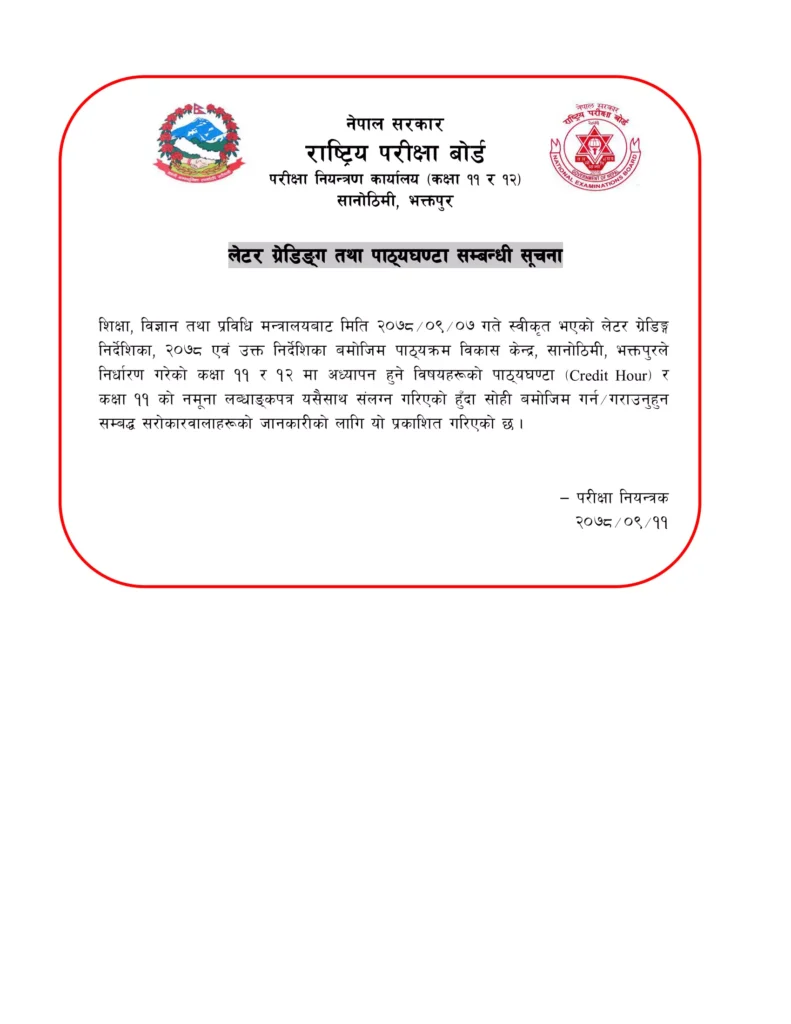
Students who have given the exam and waiting for class 12 results are still unaware of the latest grading system. The latest grading system was introduced in Nepal on 11th Poush, 2078. According to the meeting held on 9th Poush, 2078 they have made this latest grading system. The table of grading systems is as follows:
Notice of Grading SystemLatest Grading System of NepalCredit Hour Page 1Credit Hour Page 2Credit Hour Page 3Credit Hour Page 4Credit Hour Page 5Credit Hour Page 6
Hope this article cleared all your answers on how to check class 12 results. You know that you can check class 12 results through SMS with Aakash SMS and Sparrow SMS. Similarly, you can check through the website with neb.gov.np official website and neb.ntc.net.np official website.
Sample of Grade Sheet of Class 12 result
Frequently Asked Questions
How to download NEB class 12 results with neb.gov.np?
1. Search for the official website neb.ntc.net.np result 2. Click on “National Examination, NEB Class 12th Results 2080”. 3. Now Enter the symbol number and date of birth of the candidate. 4. Finally, the neb 12th result 2080 page will appear on the screen. 5. Further, students must download the result and take a printout for future reference. 6. Also, candidates should collect the original copy with a transfer certificate from the school.
How to check the class 12th results without the roll number?
Sorry, you need your roll number and date of birth to check the result of the class 12 neb board exam. You can find your roll number in your admit card which was given to you during the NEB board exam.
Is NEB Class 12 result published in 2080?
No, it is not published till now but according to official sources, the class 12 result is going to be published at the end of this Shravan month. If any technical error won’t occur, you can expect the result at that time.
What is the NEB class 12 result date?
According to official sources, the government is planning to publish NEB Class 12 results at the end of Shravan month. If any technical error won’t occur, you can expect the result at that time.
How do I check my NEB result for 2076 class 12?
You can go to the website https://neb.gov.np/results. There you need to select the past year and type your symbol number and date of birth to see your results. According to time, the settings might change and they can remove that passed year from their list.
For NTC users, checking the SIM number is always a question. Some people forget their SIM number when they have to give their number to others. Especially when they have bought a new NTC SIM Card and somebody asks them to give their number.
I believe that you also have the same problem. You also forget your own SIM number a lot and don’t know how to check the NTC number. So, here are some ways how to know the NTC number when you are in need.
Every SIM Card company provides a way to check SIM Card numbers like Ncell, Smart, and NTC. You can simply get your NTC number by following ways:-
Download Notice
Remembering your requirements we have answered some questions about what you might ask on Google. Read our whole article and print our article or save our article as a pdf. After that, you will be able to read this article offline too.
How to Check NTC Number?
First, let us clear up this question. Finding the NTC number is complicated for most of the users. They don’t remember the steps to find the NTC number. As a NTC user, I usually have to face this problem. So, here are the steps on how to check the NTC number:
To check the NTC SIM number, you need to dial *9# and call.
Then your mobile phone will display the SIM number as follows.
How to Check NTC NumberDisplay NTC Number
[Photo]
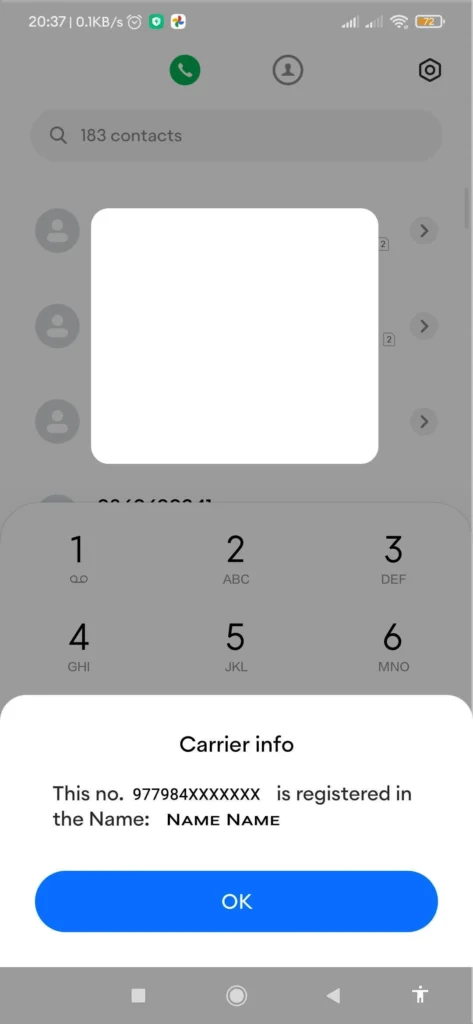
You might be confused with the MSISDN:977984XXXXXXX message. The “977” at the front is the country code. You can leave that part and remember the remaining part. Your number is “984XXXXXXX”.
Type of User Notice
This step is available only for GSM users but not for CDMA users.
How to Check NTC Number Owner Name?
Now, different SIM Card companies have given services like checking the owner’s name. Similarly, checking the NTC Number owner name service is available in the NTC number too.
Here are the steps on how to check NTC Number Owner Name:
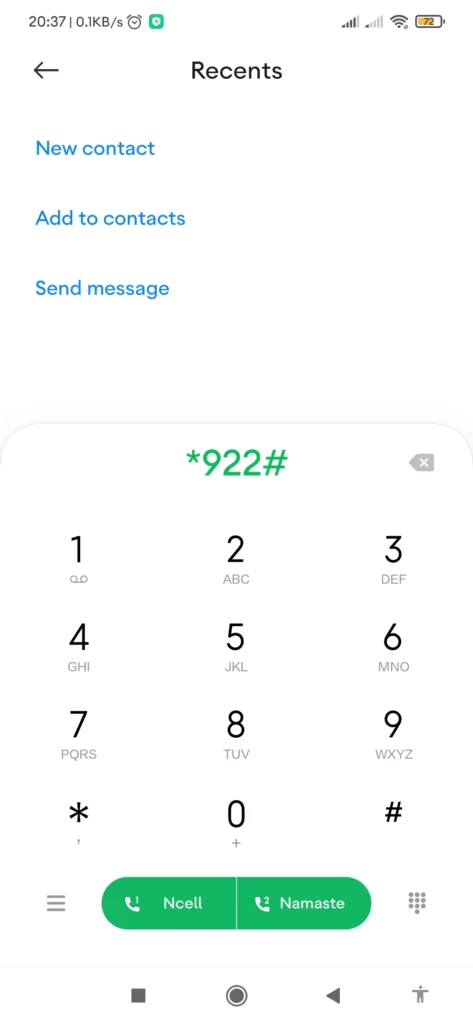
Open Dial Section and dial *922#.
Click on the Call Button. Then you can see the owner’s name.
How to Check NTC Number Owner NameDisplay NTC Number Owner Name
You can see the SIM Card number along with the SIM Card owner’s name. This process can be used instead if you want the SIM Card number also.
Not Available(NA) Notice
If SIM Card Owner Name is not available then it will display the name as “Unknown”.
How to Check NTC Number Balance?
Knowing the balance is another important thing in your SIM Card that you must be well known about. Here are the steps on how to check the NTC number balance:
Open the Dial Section and dial *400#.
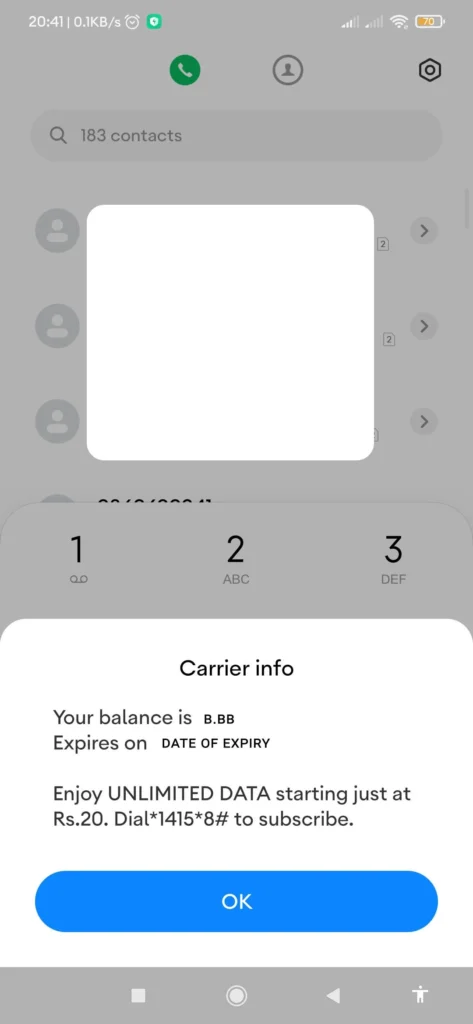
Click on the Call button. Then your screen displays the message with the balance available in your SIM Card.
How to Check NTC Number BalanceDisplay NTC Number Balance
Note: You must have to check the expiry date of your NTC number balance. So, in case you might forget, save this article as a pdf so that you can read it in the future.
Expiry Date Note
You must have to check the expiry date of your NTC number balance. So, in case you might forget, save this article as a pdf so that you can read it in the future.
Please Note
When you recharge your CDMA Prepaid phone your new balance will be the sum of your CDMA Prepaid Recharge Card’s Value and the earlier balance left on your phone.
Please Note
Now you can check the balance of both NTC and NCELL using same code. Just dial *144# to view your balance. Updated: [21th August 2023]
How To Identify NTC and Ncell Number?
Identifying NTC and Ncell numbers is not that hard. You can easily find out this thing with just these few tricks.
The NCELL number has the system as “980XXXXXXX” “981XXXXXXX” or “982XXXXXXX”. While the NTC number has the system as “984XXXXXXX”.
Just you need to look at the first three digits and then yes you can find the difference. You can know the person who is calling you or whom you are calling is NCELL or NTC SIM.
Note: If you need some information about the NTC SIM Card then leave a comment for us. Your comment helps us a lot.
Conclusion
You can check your NTC number through some simple steps. Now don’t worry if you forget your SIM Card number. You can save this article or download this article on How To Check NTC numbers in the future. Forgetting things has always been a psychological problem. As an NTC user, I always forget about the codes that help to check the NTC SIM number, owner name, and balance.
Send SUB to 1455 through SMS to activate CRBT in NTC. Send Unsub to 144 through SMS to deactivate CRBT in NTC. Color Ring Back Tone (CRBT) is widely kept in phones to entertain the users who are calling them.
How to know the NTC number?
Open your Dial section and dial *9#. Then click the call button. The NTC number will be displayed on the screen. You can view the NTC number. This is only available for GSM users but not for CDMA users.
How to know the NTC number balance?
Open your Dial section and dial *400#. Then click the call button. Then the screen displays your number balance. Please remember that your SIM number has an expiry date. So recharge your SIM Card on time to prevent this.
How can I recharge my NTC number?
Open your Dial Section and dial 1415. Then click on the Dial button. Then enter the 15-digit PIN code as requested by the service provider. Then your SIM Card will automatically recharge.
Why my NTC Sim is restricted?
It mainly happens because you somehow have broke their terms and conditions. In this situation, you can dial 1498 for customer care and share your problem with the service provider. They will handle the problem and help you to deal with it.
How can I complain about NTC?
You can dial 198 and leave the complaint. NTC will investigate the complain and help you in that situation.
Instagram Threads App is a new app which is built by the Instagram team for sharing text updates and joining public conversations. It is a newly launched app released on June 27, 2023, and the Instagram team is still working on Instagram Threads App to make it compatible with open, interoperable social networks.
Mark Zuckerberg has just announced the initial version of the Threads app. Whether you are a creator or a casual poster, Threads provide you with a platform for separate space for real-time updates and public conversations.
It is really a tough question to answer about the owner of the Threads app. Let me tell you why in some steps and make it clear who can be considered as the real owner of Instagram Threads App.
Actually Threads App is officially made by the Instagram app. If you go over Play Store to download this app, you will see their Instagram as the owner of the app. Play Store always needs the owner’s details to upload applications for users’ privacy and security. And Instagram Threads App is officially uploaded with the ownership of Instagram.
As we all know that Instagram is officially a social media company of Meta, a renowned company. So, here we can also say that Meta is the owner of the Thread company as it is the head branch of Instagram too.
Here comes the third phase, Meta is owned by Mark Zuckerberg(CEO of Meta company). So, who should we consider as the owner of the Instagram Threads App?
Threads App Logo
It’s not really a tough thing to say as most people would probably say it’s obviously Mark Zuckerberg but what if we talk about the company? Which company owns the app? Is it Instagram or Meta? So, here I would like to say Instagram.
Instagram or Meta: Who is the owner?
I know what you are gonna say after reading the above thing. But the fact is, the Instagram company is the real owner of the Instagram Threads App.
Instagram is not the real property of Mark Zuckerberg and he is not the founder of it either. Instagram was created by Kevin Systrom and Mike Krieger. Then later Meta bought it. You can check out the question: Who is the owner of Instagram? It will prompt you with an answer i.e. Meta.
Instagram is itself a separate company so it’s better to say that Instagram Thread App is owned by Instagram as officially written in Playstore.
How to get started with Instagram Threads App?
Open Threads App.
Threads will automatically recognize your logged-in Instagram account.
You can import your Instagram details into the Threads App and start.
Or, you can manually fill in all the details.
Threads App Profile Setup
What you can do with Instagram Threads App?
Access your Instagram followers
Your Instagram username and verification badges are reserved for you. Automatically follow the same accounts you follow on Instagram in a few taps, and discover new accounts too.
Threads App has already got a username reserved which has been used in your Instagram. So, you are going to get the same username as Instagram. This feature could be loved by most users. Analysts have really used their business minds over there. Nobody would love to have several usernames on different platforms and remember all of those.
Share your point of view
Spin up your new thread about what’s on your mind. This is a space to be yourself, and you control who can reply.
Threads App New Thread
Connect with friends and your favorite creators
Jump to the replies to get in on the action and react to commentary, humor, and insights from the creators you know and love. Find your community and connect with people who care about whatever it is you’re interested in.
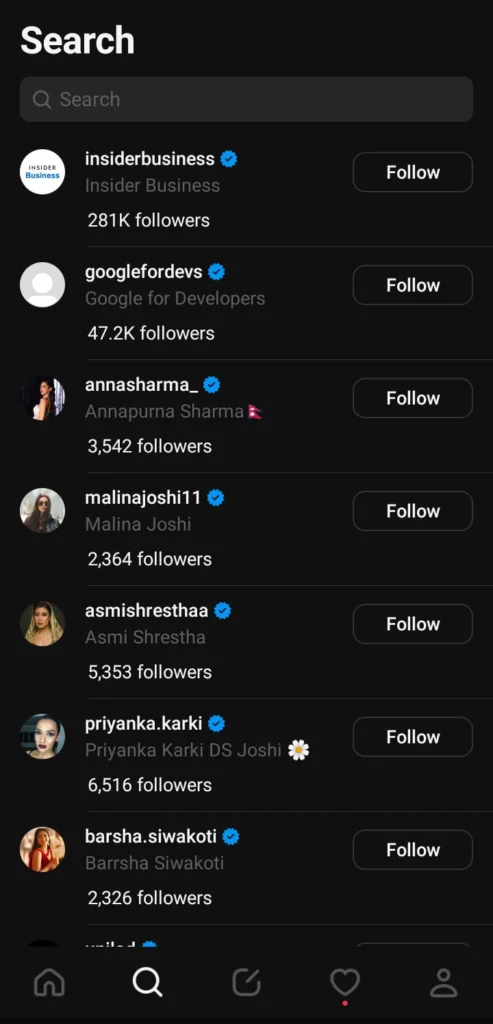
Threads App Search Users
Control the conversations
Customize the settings and user controls to manage who can see your content, reply to their threads, or mention you. Accounts you’ve blocked will be carried over from Instagram, and they are enforcing the same Community Guidelines to help ensure everyone interacts safely and authentically.
Find ideas and inspiration
From TV recommendations to career advice, get answers to your questions or learn something new from crowd-sourced conversations, thought leaders, and industry experts.
Threads App News Feed
Never miss a moment
Stay on top of the latest trends and live events. Whether it’s about new music, movie premiers, sports, games, TV shows, fashion, or the latest product releases, find discussions and receive notifications any time your favorite profiles start a new thread.
Open social networking – Coming Soon
In the future, there will be ways to discover more content and reach wider audiences.
Don’t worry! Instagram Threads App doesn’t sell or steal your data. But it needs some permissions to be granted from your device. Here are some of the few things in your device which are accessed by the Threads App.
Location
Microphone
Identity
Contacts
Photos/Media/Files
Wi-Fi Connection Features
Camera
Storage
Receive data from the internet
Part with Bluetooth devices
Run at startup
Draw over other apps
Prevent the device from sleeping
View network connections
Reorder running apps
Use accounts on the device
Control vibration
Control audio settings
Full network access
Data shared
Name
Email Address
User Ids
Phone Number
Device or other ID
Data Collected
Location (Approximate and Precise Location)
Personal info (Name, Email Address, User IDs, Address, Phone Number, Political or religious beliefs, Sexual orientation)
Financial information( User payment info, purchase history, credit score)
Health and Fitness Info
Messages
Photos and Videos
Audio
Files and Docs
Calendar
Contacts
App activity
Web browsing
App info ( Crash logs, Diagnostics)
Now you might be thinking that it is really safe after seeing that Instagram Threads App is collecting these numbers of data from us. Like other social media apps, it also collects data to optimize its system so that you will get the best user experience.
We are online in Instagram Threads App too, So do follow us over there. Click here to follow.
Frequently Asked Questions
Is Instagram’s Thread App popular?
In this short duration of time, Instagram Thread App has already gained 10M+ downloads. Instagram Thread is used by almost all Instagram users. So, we can say that this app has become popular in this short course of time too.
Does it run on every device?
Yes, this app is available both on Android and iOS. Instagram has officially released this app for free for both Android users and iOS users. Every users can now post a new thread and share their thoughts and ideas to their followers.
How many users are registered in this app?
In a little while after its launch it had gained 55M+ registered users. It is quite large talking about the launch of any other applications till now. Instagram Thread has soon gained the market.
Is it similar to Twitter?
This has similar functions like Twitter: users can post text, images, and videos, reply to, repost and like posts of others. Instagram Thread seems like it has got many copied features. Recently it has copied the thread text limitation of Twitter.
What is the difference between Threads and Twitter?
Twitter provides trending topics in the news feed while Threads is just limited to scrolling through the news feed only for now. Threads is just focused on sharing ideas with followers basically but Twitter is focused on providing extra information about the things happening in this world. Twitter aware people more.
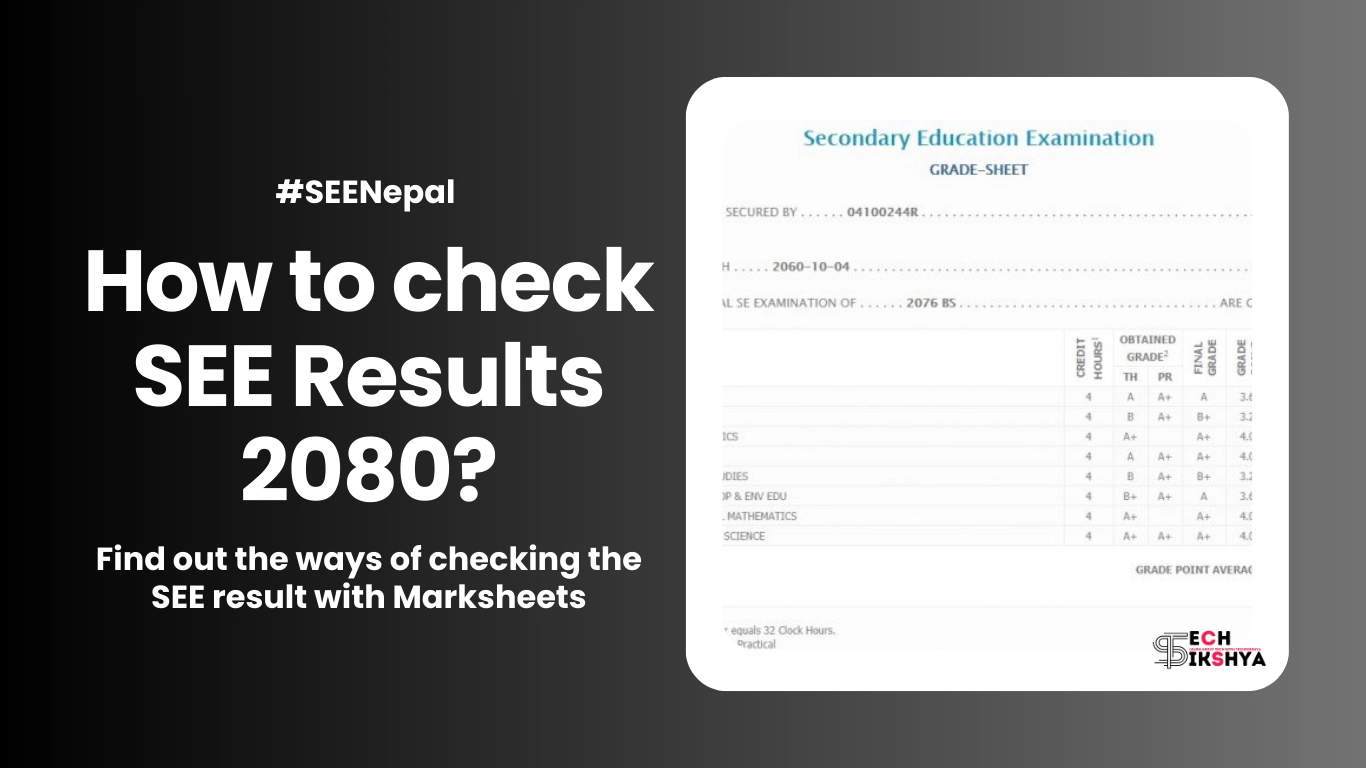
SEE Exam 2079/80 was held in Chaitra starting from 17th Chaitra, 2079 to 26th Chaitra, 2079. There is a rumor that SEE Result is going to be published in the fourth week of Ashad. So, here we are to give you information about how you can check SEE Result 2080 with Marksheet.
The National Examination Board(NEB) has announced that they had already finished checking copies in the third week and started to take entry marks online from 17th Ashad,2080. Now, NEB is doing the final preparations to get entry marks and verify them before publishing SEE Result 2080.
According to official sources, we have got the information that NEB has called a meeting today (19th Ashad, 2080) for the result publication. But due to some technical errors during marks entry and verification, it has been postponed until the next notice.
But NEB has confirmed that the exam will be published till Friday if any kind of technical error won’t occur in the system. Let’s wait for the result.
Ways to check SEE Result 2080 with Marksheet
I know you have been waiting too long to see your SEE Result 2080 with a marksheet and thinking about how you can view it. No worry about it, now viewing the result marksheet has become way easier. You no longer have to see your result in newspapers like Gorkhapatra like in the past days. Students can now check the result with mark sheets through different apps and online websites. You can see SEE Result 2080 through:
Websites
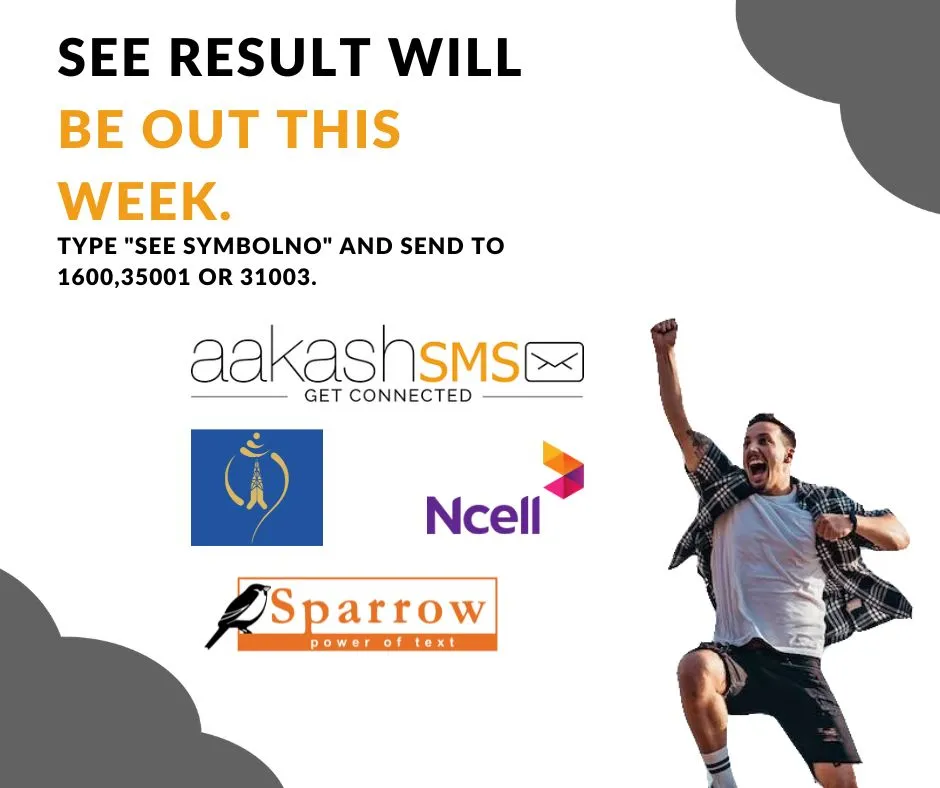
SMS
IVR
Check SEE Result 2080 with Marksheet through Websites
First, let me tell you that there are certain organizations that will have permission to publish SEE Result 2080 with marksheet as per the government announcement. Here are some of the websites which will be publishing the result online with mark sheets for sure.
In order to check your SEE result, you must have to know your symbol number first. If you don’t know your symbol number then you can check it on your admit card which you got from your school during the SEE examination.
As soon as the SEE Result 2080 is going to get published then many students are going to open the websites at the same time which will increase the traffic on the website. Any website would not be able to handle this much traffic. So, you can check your result through sms easily. But you cannot check SEE Result 2080 with Marksheet through sms.
Here are the steps you can follow to check SEE Result 2080 with marksheet:
Open the messaging app on your phone.
Type “SEE” followed by a space and symbol number. (eg: SEE 0121323D)
Send this message to the number 1600.
After a while, you will receive your SEE result in your message box.
You can also check the SEE Result 2080 with marksheet through Sparrow SMS as they are also authorized to provide SEE result:
Type SEE and space then symbol number.
Send the SMS to 35001.
Example
Send a message like “SEE 0121323D” to 35001
You can check the result through Akash SMS too:
Go to the messaging app on your device.
Type SEE and space then symbol number.
Send the SMS to 31003.
Example
Send a message like “SEE 0121323D” to 31003
Get Result Through SMS
Check SEE Result 2080 with Marksheet through IVR
You can also view the SEE Result 2080 through Interactive Voice Response System(IVRS). This helps you to hear results with landlines and phones.
You can check to see the result through IVR by following the steps:
Dial the number 1600.
Follow the instructions to obtain your SEE Result.
You will be charged Rs. 2 per minute for a single symbol number as per our latest news.
Note
The marksheet downloaded from the websites will not be considered valid. Hence, students need to collect their original mark sheets from their respective schools.
How schools can check SEE Result 2080 with Marksheet?
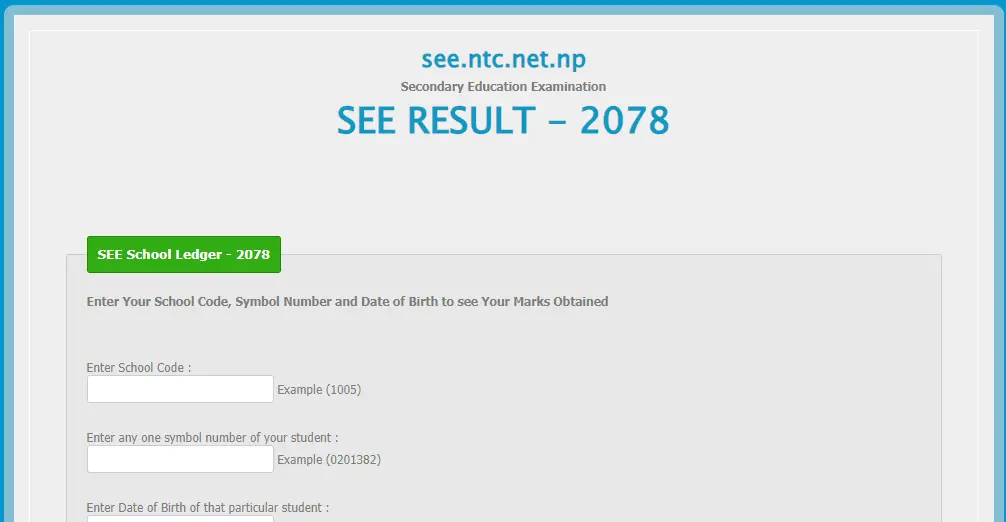
Schools can download Mark Ledger of their school by entering the following link:
Enter your school code given by the education office.
Enter your one symbol number of valid students.
Enter the date of birth in YYYY-MM-DD format of the above symbol number.
Click the Submit button to download.
SEE Admin Page for Ledger
Grading System for SEE or Grade 10
Why Redmi Phones are popular nowadays? Check out Redmi Phones over here…
Conclusion
In conclusion, I hope all the students get good marks in SEE Result 2080. After you have passed, you need a list of smartphones with their prices. Click here for smartphone prices.
The full form of SEE is Secondary Education Examination.
How many students were there in SEE 2079?
According to the National Examination Board(NEB), 484,227 students altogether gave the exam in SEE 2079 including 13 students from Tokyo.
Has SEE Result 2080 been published?
No, it has not been published but NEB has announced to publish it till Friday if no technical errors will come.
Is there any Not Graded(System)?
The board meeting held on Tuesday has decided not to apply the system of non-graded to those who score less than 35 percent in the Secondary Education Examination (SEE). Therefore, it has been decided that the SEE Result 2080 is going to be published within the old method.
How can I check my SEE Result 2080 online with a marksheet?
Punch hole display, also known as hole-punch display or camera cutout display, is a design that maximizes the screen-to-body ratio and minimizes the bezels combining the selfie camera directly into the display.
At first, this display was installed on the Samsung Galaxy A8s around December 2018. At the time, the Galaxy A8s featured a circular cutout in the top left corner of the screen to house the selfie camera. This design was like a setting sun for the notch design that was popularized by the iPhone X in 2017.
After that, many smartphone manufacturers have adopted these displays in their devices. Samsung continued to use this design in its Galaxy A series and Galaxy S series smartphones as it gained popularity among smartphone users. Other companies like Huawei, OnePlus, Motorola, and Xiaomi have also released devices with punch-hole displays in different shapes and sizes. Benco S1 also has this design, which has been reviewed by one of our reviewers.
Punch Hole Display
These displays are typically oval and are located in the top center or top corner of the screen. It houses a selfie camera and sometimes additional sensors like ambient light sensors or proximity sensors. Its size varies depending on the smartphone manufacturers and models.
Pros of Punch Hole display:
Increased body-to-screen ratio: This results in an immersive viewing experience and offers a larger viewing area for the users. You can watch videos on a bigger screen.
Retained Front Camera Functionality: Users can still click photos, record videos and use facial recognition features without compromising camera quality and performance.
Aesthetically Pleasing Design: This display blends more with the screen, providing a better design to the display.
Cons of Punch Hole display:
Visual Distraction: This display seems like a disturbance to the viewing area especially when you are watching videos. The videos will be a black water droplet-like structure hiding some parts of the videos.
Limited Placement Options: Manufacturers won’t get more options while placing it over the display screen as it needs to be adjusted in a proper place.
Hamper website: Many websites over the internet are not well designed to get adapted for the punch hole display. So, it may not be good to view those websites better.
Punch Hole and Notch Displays
Conclusion:
These displays are out of the way when it comes to providing a body-to-screen viewing experience. Due to this aesthetic feature, this design has been gaining popularity among smartphone users in the market. This is our future as this design creates an exclusive immersive viewing experience for smartphone users. As a reviewer for this website, I would love to say that I am in love with this design. After watching the latest movies, I found that this design is better when it comes to watching videos with unlimited screen capacity.
Frequently Asked Questions
What is a punch hole display?
There is a tiny hole in the display of the screen which provides housing for the selfie camera.
Which is better: notch or punch hole display?
The answer is punch hole display because it is smaller than notch and provides a better viewing experience.
What is the disadvantage of a punch hole display?
Any problem in the display like scratching can affect the picture quality.
Does the iPhone have punch hole displays?
Till now the iPhone has not given this display but it could be seen in the future in iPhone 14 and others.
What is the difference between iPhone notch and punch hole display?
iPhone notch provides an attached selfie camera to the bezels but the iPhone punch hole display provides a selfie camera separated from the bezels.
For normal schools, the school management system has always been a headache for the past few years. As the country is developing and stepping towards modern society, the schools also must move forward in the context of their management system. Many of the schools in Nepal are still stuck in their paper-based work while other modern societies have moved so forward. Now it is hard to catch their pace. So, here comes a new management system with some extraordinary features. Would love to see the next-level features that none have seen till now using Excel.
Let us not forget that there are many school management software engineered by software developers or web developers using programming languages like Java, PHP, and JavaScript. Some also use free website-building tools like WordPress as a platform to develop this software. But they are very expensive to buy for ordinary schools like in village areas that struggle to fulfill their basic demands too. So, here’s a brief introduction to the school management system.
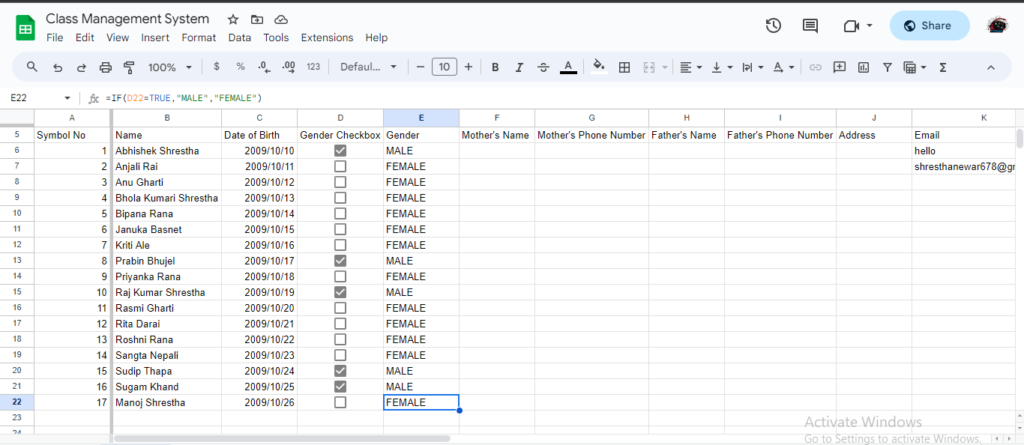
The Student Management System or Student Information Management system’s first expectation is to store the students’ details in a more manageable way. Our system has a student database management system which helps to store information in a more user-friendly manner. Our system stores :
Symbol Number
Name
Date of Birth
Gender
Father’s Name
Father’s Phone Number
Mother’s Name
Mother’s Phone Number
Email Address
Add Student
Detail Management System Features
Filling in the details like gender has been easy due to the checkbox system. Now, you can just determine whether the user is male or female just by checking and unchecking the checkbox.
When you are filling in the student email details, it will check whether the email is valid or not.
Once you have updated the student details in the detailed management sheet, it will be automatically added to the other sheets.
Student Results Management
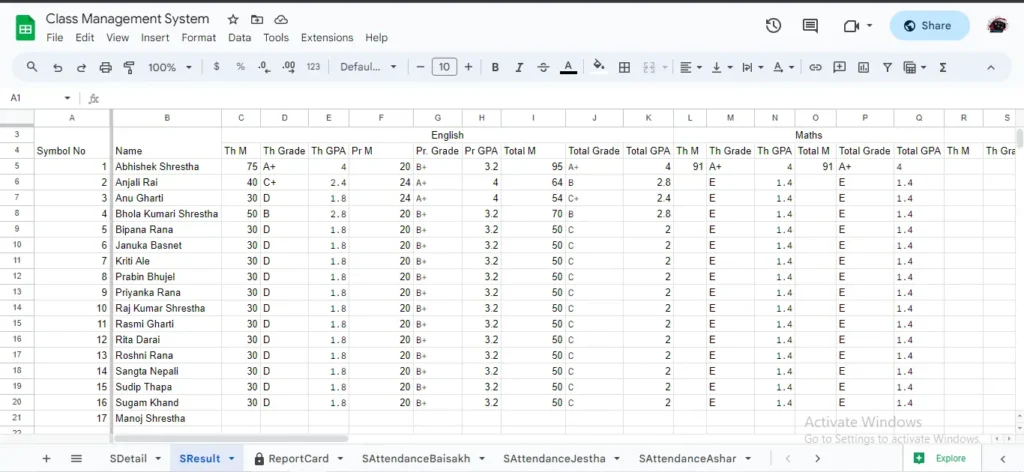
The Student Management System also has a result management system embedded with it for the result-making process of students. Result management is more focused on the yearly examination rather than terminals or other examination systems. But as per your demand, we can increase its facilities to other examination systems too. By default, we have included some subjects like English, Math, Science, Social, Nepali, Optional-I, and Optional – II as a demo.
Marks Entry
Result Management System Features
You can add theory and practical marks separately as per your needs.
This system is based on the modern GPA and Grade System.
You can get the total marks and percentage as an admin.
This system finds the rank of the students by comparing specific sets of students’ total marks in the result database.
The results also focus on the attendance calculation too.
Report Card Generation
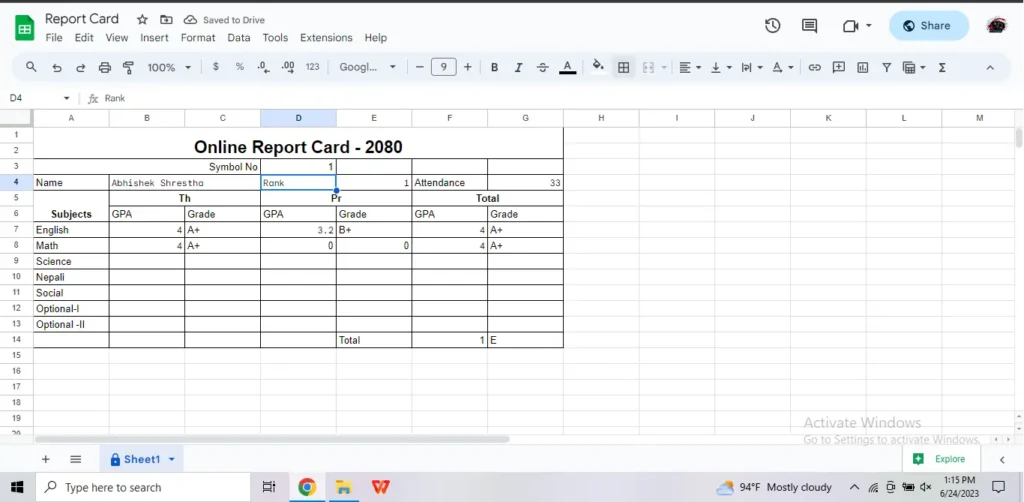
One of the big issues that are faced during result management is the creation of report cards. This system also has a report card generation facility which could be provided to the students online too, where they will input their symbol number and can look up their report card dynamically.
View ResultView Report Card
Report Card Generation Features
Report Cards can be delivered online like any other website. As SEE and NEB results are made available online, this system also makes the results of students available online.
Report Cards can be generated for a specific symbol number dynamically.
Student Attendance System
The system does attendance for 12 months, starting from Baisakh to Chaitra. Similarly, you can see the total attendance at the end of every month and track your student’s attendance record in the class.
Attendance is based on a checkbox system which makes it easy to attend.
Conclusion – School Management System
School Management System is based on the digitalization of paper-based work and automatizing the work. The scope is to provide services for low-end schools, especially in the village areas. If you would like to develop this system, then we are here to hear your demand and provide the system into your hands. The price will be negotiable.
You can check the report cards of dummy students over here: Dummy Report Card
Frequently Asked Questions
How can Excel be used at school?
Our system is a perfect example of its use at school. You can use it to manage student details, create results, report card generation, attendance, fees, etc.
Can we talk about the features needed for our school for modification?
In the first stage when it comes to buying the product, we will listen to your demand list. The price will be negotiated as per the demand.
Can we use our results ledger sheet on our computer to report card generation online?
Yes, you can share your mark sheet ledger sheet online with us and we will prepare a report card online which can be shared with your students. Your student will be able to view their report card after validation.
Is there any free maintenance?
Sorry to say that there is no free maintenance, but you can contact us in the future for any error in the system with additional charges.
Do we need Excel skills to handle this system?
Yes, it fully depends upon Excel skills. Basic knowledge of Excel is required.

![How to Use TikTok in Nepal after Ban? [With and Without VPN]](https://wordpress-inuw7.wasmer.app/wp-content/uploads/2023/11/Tiktok-Ban-in-Nepal.webp)





![SSD Price in Nepal [2023]: Which SSD Is Better?](https://wordpress-inuw7.wasmer.app/wp-content/uploads/2023/08/ssd-price-in-nepal-2023.webp)









![How To Check NTC Number? Learn Easily In Seconds [Updated]](https://wordpress-inuw7.wasmer.app/wp-content/uploads/2023/07/how-to-check-ntc-number-2.webp)