Blog

  • Xiaomi Redmi A2 Price In Nepal: Best Budget Phone [2023]

    Xiaomi Redmi A2 Price In Nepal: Best Budget Phone [2023]

    Xiaomi Redmi A2 Price in Nepal is an Android smartphone that was released on 2023, March 24.  Redmi A2 is a sub-brand of Xiaomi and usually, their devices are mostly budget friendly and made cheaper where people can afford easily. On the other hand, Xiaomi is the flagship brand of the company.

    With the Xiaomi Redmi A2 price in Nepal, you have many questions so let’s discover the specs, features, price in Nepal, and other more details. 

    Xiaomi Redmi A2 Phone
    Featured Photo

    Xiaomi Redmi A2 Price in Nepal

    Xiaomi Redmi A2 Price in Nepal (2+32GB) has been recently launched which costs NRs 10,499. If you want cheaper with the best design and better performance, Xiaomi Redmi A2 is the best one for you. Now, you can buy this phone in your nearby areas but we will provide you clear details about the Xiaomi Redmi A2 price in Nepal for why you need to buy this mobile.

    Xiaomi Redmi A2Price in NepalAvailability
    2/32GBNRs. 10,499Hukut 
    3/32 GBNA(Not revealed in Nepal)Retail stores
    4/64 GBNA(Not revealed in Nepal)Retail stores
    Xiaomi Redmi A2 Price in Nepal Table

    Hukut is providing a 2 years warranty on this device recently. So, grab it. It’s a single offer that won’t come again and again.

    Note

    If you want to buy this mobile as an online platform, Hukut  will provide you this mobile with discounts and with gift cards too.)

    Redmi A2 Specifications

    Network2G/3G/4G/GSM/HSPA/LTE
    Display6.52 inches, IPS LCDbrightness:400 nits
    Battery5000mAh
    ConnectivityWifi 4
    Battery TypeLi-Po 5000 mAh, non-removable
    Charging 10 W
    Dimensions1.64.9*76.8*9.1 mm(6.49*3.028o.36 in)
    Resolutions720*1600 pixels
    Colorsmicro USB 2.O
    Operating SystemAndroid 12 (Go edition)
    ChipsetMediatek Helio G36
    CPUOcta-core with Max clock speed of 2.2ghz
    GPUPowerVR GE8320
    Memory 2/32GB & 3/32GB & 4/64GB
    Rear Camera8 MP,F/2.0,(Wide)
    Front Camera0.08 MP(depth)
    FeaturesDual-LED flash, HDR
    Video1080p@30fps
    Bluetooth 5.0,A2DP, a/b/g/n
    USBmicroUSB 2.O
    Specification Table of Xiaomi Redmi A2

    Xiaomi Redmi A2 Overview

    Design and Quality

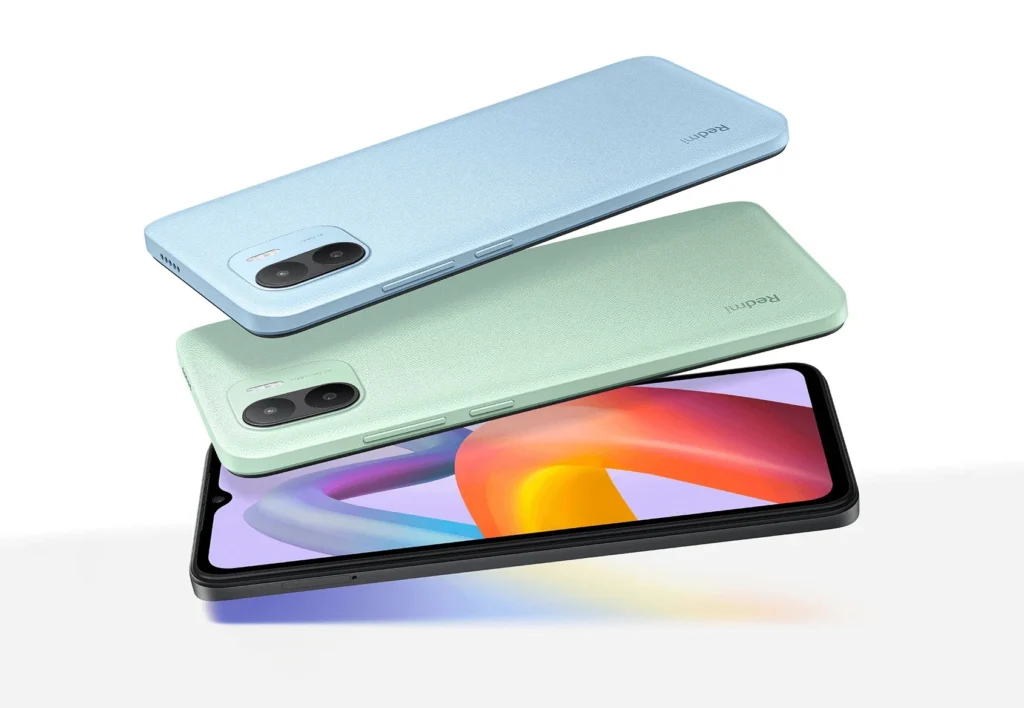
     The most important factor when buying a mobile phone is its design. In Redmi A2 we can find there is a leather texting design which is very quite impressive and attractive. On the right side, there is a volume up and down button as well as a switch on and off button.
    Redmi A2 Design and Build Quality
    Good Texture and Build Quality

    Redmi A2 comes with a trendy and stylish design of black, green, and blue color. The textured black panel has a premium look with resist fingerprint and is comfortable to hold for a long time for the user. You can find two cameras lined up one another with a flashlight in Redmi A2 which will capture memorable moments of your life.

    Portrait mode allows you to produce natural effects in the background allowing your subject to stand out in a crowd. You can fully take advantage of the Xiaomi Redmi A2 price in Nepal.

    The main critical issue is there is no gorilla glass, only simple glass is provided for scratch resistance in the phone if you are going to buy Xiaomi Redmi A2 Price in Nepal.

    Display 

    In Redmi A2, we can find a large 6.52” HD display which provides you with a more stunning experience while playing and watching videos. The 6.52 HD” full-screen display will provide you a clear broader view when watching movies with your friends, family as well as when you are lonely with a maximum 400 nits brightness on Redmi A2 mobile phone. 

    Redmi A2 Display
    Impressive Display

    Getting a better display with an affordable Xiaomi Redmi A2 price in Nepal allows you to play games Like Candy Crush, Car Racing, Bike Racing, Subway Surfers, Free Fire, etc. In Redmi A2 you can find 720*1600 pixels dimensions which provide you a better view with watching videos like movies, entertaining videos, or one of your favorite videos in a HD view.

    In the Redmi A2 mobile phone, we can find 269 pixels per inch which measure the display resolution, or pixel density, of a computer monitor or screen and provides scratch-resistant protection for the glass.

    Performance

    With the Xiaomi Redmi A2 Price in Nepal, for the performance of Android 12 Go MIUI OS Redmi A2 price it provides you a micro SD card slot with octa-core up to 2.2GHz and MediaTek Helios G36 chipset so you can easily bring tons of content around with you in a pocket and can store more photos, videos, and music on your phone up to 1 TB expandable storage.

    Redmi A2 Performance
    Marvelous Performance At a Low Price

    With a maximum 4GB RAM/64GB ROM memory capacity you can store videos, music, or other apps etc on your mobile phone. But in case you are going to buy 2GB RAM/32GB ROM  mobile phone storage you can store only a limited amount of videos, music and in this 21st century it is not efficient so you can expand up to 2 GB storage etc.

     As we know the price is cheap so according to Xiaomi Redmi A2 Price in Nepal, it is good for normal tasks but in the case of playing games like Free Fire, Candy Crush, Temple Run, etc it is not much effective. 

    With the massive 5000 mAh battery and 10W fast charging capacity, you can enjoy your battery life all day long by saying goodbye to low battery anxiety.

    Camera

    As we know if we are going to buy a phone in Nepal people will mostly look at camera specs . For buying mobile phones having a camera of Xiaomi Redmi A2 price in Nepal you can look under the image having two line cameras up on another of 8MP and discuss the Redmi A2 camera.

    In Redmi A2 we can find the camera is divided into two categories with a flashlight.

    1. Rear Camera: In the rear camera the main camera is 8MP,f/20 and the depth camera is 0.08MP. We can find that the backside camera provides you with very sharp clarity.
    Redmi A2 Camera
    8MP Rear Camera

    photos. With the Xiaomi Redmi A2 Price in Nepal, in the context of the camera, it is totally good and provides good photos in the daytime on the basis of price point but at night time it does not provide the expected photos as users want.

    Redmi A2 Rear Camera
    Sharp Rear Camera

    2. Selfie camera: The selfie camera is 5MP,f/2.2 1080@30 fps which provides you with a clarity selfie and you can beautify it too. You are going to have a better selfie experience on this Redmi A2 mobile phone.

    We can use HDR mode which can come in handy when shooting scenarios with high-contrast situations to get the right balance of the exposure. Here are some images of HDR mode on and off.

    Redmi A2 Potrait Mode
    Portrait Mode

    Likewise in the case of videos that have 1080p@30fps, you can do time-lapse photography and short videos. On the basis of price, it is incredible on taking videos too.

    Other Features

    Security

    Redmi A2 Security
    Face Unlock Security Feature

    With the Xiaomi Redmi A2 price in Nepal, it provides security of face unlock only but not fingerprint. A fingerprint sensor is not available in Redmi A2 mobile phones. This is one of the main disadvantages and critical issues of having a Xiaomi Redmi 12 phone.

    Network

    Redmi A2 Network
    4G Network Connection

    There is a network that starts from 2G minimum and 4G maximum. If you want a 5G network on this mobile phone, sorry it is not available. It also has GSM/HSPA/LTE which provides better network facilities for you.

    Sensors

    In Redmi A2 mobile phones there is a sensor called Accelerometer. An Accelerometer sensor is used for measuring accelerations; together with another sensor, a gyroscope it helps to detect changes in the position of the mobile phones like shaking, rotating, swinging, tilting, etc.

    Wi-Fi

    In Redmi A2 we can find the Wifi 4 which is referred to as the standard IEEE 802.11n which supports 20 MHz and 40 MHz bandwidths. It can support a range of about 70 meters in indoors and 250 meters in outdoor environments.

    Bluetooth

    Likewise In Redmi A2, we can find Bluetooth 4.0 which is an optimized version of the wireless Bluetooth technology standard for data exchange over short distances.

    Battery Type

    Redmi A2 Battery Type
    5000 mAh Battery Capacity

     The battery type is Li-Po 5000 mAh which helps you to charge in a fast way and there is no worry of charging as well as it is non-removable.

    Navigation and Positioning

    You can find GPS L1 signal, GLONASS G1 (Globalnaya Navigatsionnaya Sputnikovaya Sistema G1), BDS B1I whose frequency is 1561.098, and Galileo E1 which is modulated by spreading codes of length 4092 with a rate of 1.023 chips/secs.

    If you are going to buy the Xiaomi Redmi A2 price in Nepal you will find package materials where there will be a warranty card, users guide to using mobile phones with their pros and cons, SIM eject tool to insert the SIM card, and used for taken out SIM, USB cable, adapter which is used for providing power supply and helps to convert one type of voltage to another and a charger with 5000 mAh.

    You can also check out: Redmi Note 9 Price in Nepal || Xiaomi 13 Pro Price in Nepal

    Reasons to buy Xiaomi Redmi A2 Price in Nepal

    Based on the above specs and overview you can see the list of pros and cons (advantages and disadvantages) of the Xiaomi Redmi A2 Price in Nepal smartphones.

    Pros

    1. Cheap: As compared to other Redmi mobile phones, Xiaomi Redmi A2 Price in Nepal is considered the cheapest price mobile phone with great performance. People can get an affordable price that they want and it is the best one for users.
    2. Huge Battery Capacity: The battery is about 5000 mAH which is used for fast charging and the charger remains for a long time too.  
    3. An audio jack is present: An audio jack is a small port that helps you to connect wired headphones, earphones, and other audio devices to your mobile phones for audio output.
    4. Available in multiple color options:  You can find multiple colors in Xiaomi Redmi A2 Price in Nepal. The color of the Redmi A2 mobile phones which you want to buy is Aqua Blue, Classic Black, and Sea Green.
    5. Dedicated microSDXC card slot: You can get a microSDXC memory card which is used for storing large amounts of data like videos, music photos, and many other files. You can expand the mobile phone’s storage capacity by inserting a microSDXC slot in Redmi A2 mobile phones.

    Cons

    1. Low RAM and storage variant: If you are going to buy the Xiaomi Redmi A2 price in Nepal you will find a low which starts from a minimum of 2GB and a maximum of 4GB.But now 2GB RAM is only available in Nepal which is also recently launched. You need to add 2GB RAM for more storage. 
    2. Android 13 missing: You can find that in Redmi A2 only Android 12 OS is available. The latest 13 OS is missing from the Xiaomi Redmi A2 price in Nepal.
    3. Not for heavy users: If you want heavy work as compared to other mobile phones then this Redmi A2 mobile phone is not effective for users. It is good for only normal work.
    4. Outdated camera setup: You can see the Redmi A2 phone has an outdated camera setup which is typically old-fashioned and lacking compared to recent models or current technology mobile phones.
    5. Without reverse charging support: You can get reverse charging support which does not have the ability to function as a power source to charge other devices.

    Conclusion

    After reading the specifications, overview, pros, and cons of Redmi A2 smartphones, I hope you got a clear idea about the phone. As the Xiaomi Redmi A2 price in Nepal is cheaper and budget friendly with great performance it is the best smartphone. If you buy this Redmi A2 mobile phone or your friend bought it what review would you give please you can comment down your thoughts too. .
    Frequently Asked Questions

  • How To Check Class 12 Result : Easy Way to See Your Result Fast

    How To Check Class 12 Result : Easy Way to See Your Result Fast

    Now finally, the time is coming. The Government of Nepal has finally announced the publishing of the NEB Class 12 Result. Here, you can get to know how to check class 12 result 2080. 

    NEB Class 12 Exam 2080 started on 26th Baisakh 2080 and ended on 5th Jestha 2080. After that many students will pursue careers in different fields of interest. Many of you are trying to go abroad to study. 

    Don’t know about your future but now you are probably thinking about your class 12 result. And I know you want to know how to see the NEB class 12 result 2080

    So, here is our article on How to Check Class 12 Result 2080 to help you find your NEB class 12 result 2080 with a mark sheet

    When will Class 12 results 2080 publish?

    Since a few days back the news has gone viral on the news channel that the government will publish class 12 results 2080 at the end of Shrawan month. This news is 100% true. 

    Before knowing how to check class 12 results, let us know why we should expect NEB Class 12 results at the end of Shrawan month. According to the NEB Official, they have already finished and started to enter the marks into the database for the result-making process. 

    We are sure that the government is going to publish the result soon as told in Shrawan Month as per the official source. Let us wait and think positively about the NEB Result 2080.

    Please note that:

    If there is any technical error, the result date might be postponed. The result could be published in the first week of Asar week. 

    How to Check Class 12 Result 2080 By SMS?

    Different official organizations deliver the class 12 result every year. But there are a few organizations chosen by NEB for delivering the result quickly. Others deliver the result just for the traffic. 

    You can check your class 12 result by sms through: 

    1. Aakash SMS
    2. Sparrow SMS
    How to check class 12 result through SMS
    Ways for How to Check Class 12 Results Through SMS

    How To Check Class 12 Result By Aakash SMS?

    Checking your NEB Class 12 result has been pretty easy since AakashSMS started to deliver the result in the past. AakashSMS is cheap and an easy means for getting your GPA fast on your mobile phone. 

    To check class 12 results by AakashSMS, you can:

    1. Go to your mobile’s message box.
    2. Compose a new message.
    3. Type NEB <space> symbol number. 
    4. Send an SMS to 31003.

    If your symbol number is 123456 then type ‘NEB 123456’ and send it to 31003. 

    After that, you will receive a text of your results.

    Please note that:

    NEB Class 12 Result will take a bit of time to become online as they have to upload the database first. But you can get there fast with SMS. 

    How To Check Class 12 Result By Sparrow SMS?

    Along with Aakash SMS, another organization is also giving service to view NEB class 12 result 2080. Sparrow SMS was also popular with most of the students in the past. 

    Let’s see how to check class 12 result 2080 by sparrow sms. Here are the steps: 

    1. Go to your mobile’s message box.
    2. Compose a new message.
    3. Type NEB <space> symbol number.
    4. Send an SMS to 35001.

    If your symbol number is 123456 then type ‘NEB 123456’ and send it to 35001. After that, you will receive a text of your results. If you want you can even check your class 12 result 2080 with marksheet online. 

    Please note that:

    Please check your NEB Result 2080 after the result is published.

    How To Check Class 12 Result 2080 with marksheet?

    The limitation of SMS is too irritating for most of the students. Like they can see the GPA but can’t get the grade and GPA of every individual subject together at a place. 

    So there’s an answer on how to check class 12 result 2080 with a mark sheet. There are some websites like neb.gov.np results-official website of NEB and neb.ntc.net.np results-official website of NTC. These websites help the students to view mark sheets online. Let me write down the websites in the list:

    1. NEB website: https://neb.gov.np/results
    2. Nepal Telecom: https://neb.ntc.net.np

    Please note that:

    If you view these websites now. Then you might get different results which you have not expected. So, check these websites after the NEB 12th class result 2080 has been published. 

    How To Check Class 12 Result with neb.gov.np?

    The majority of the students may be concerned about checking the class 12 result with a mark sheet. Here neb.gov.np website helps you to check class 12 results online

    Here are a few steps about how to check class 12 results online with the neb.gov.np website. 

    1. Visit the official site of https://neb.gov.np 
    2. Click on the नतिजा link at the top.
    3. Provide your symbol number and date of birth. 
    4. Click on the Search Button and the result will appear on your screen.

    Or else you can directly check the class 12 results with these steps:

    1. Visit https://neb.gov.np/results
    2. Provide your symbol number and date of birth.
    3. Click on the Search Button and the result will appear on your screen. 

    With these above steps, you can check the result of class 12 online with a marksheet. 

    Photo of neb.gov.np Official Page
    neb.gov.np Official Page

    How To Check Class 12 Result with neb.ntc.net.np?

    Nepal Telecom has also created a website of theirs to check the NEB results online. They have seen your question on Google or any search engine about how to check class 12 results. 

    Let us know how to check class 12 results with neb.ntc.net.np. Here are the steps: 

    1. Search for the official website https://neb.ntc.net.np/
    2. Now enter the symbol number and date of birth of the student. 
    3. The result of class 12 students will appear on the screen. 

    You can download a copy of the online mark sheet and print it for future purposes. 

    Photo of neb.ntc.net.np Official Page
    neb.ntc.net.np Official Page

    Please note that:

    You can collect a character transfer certificate from the college. You can collect provisional certificates and migration certificates with a marksheet from the NEB office located around your college. 

    How to calculate the GPA of class 12?

    After knowing how to check class 12 result 2080, you might want to know how to calculate the GPA of class 12. So here is a formula to calculate the GPA of class 12

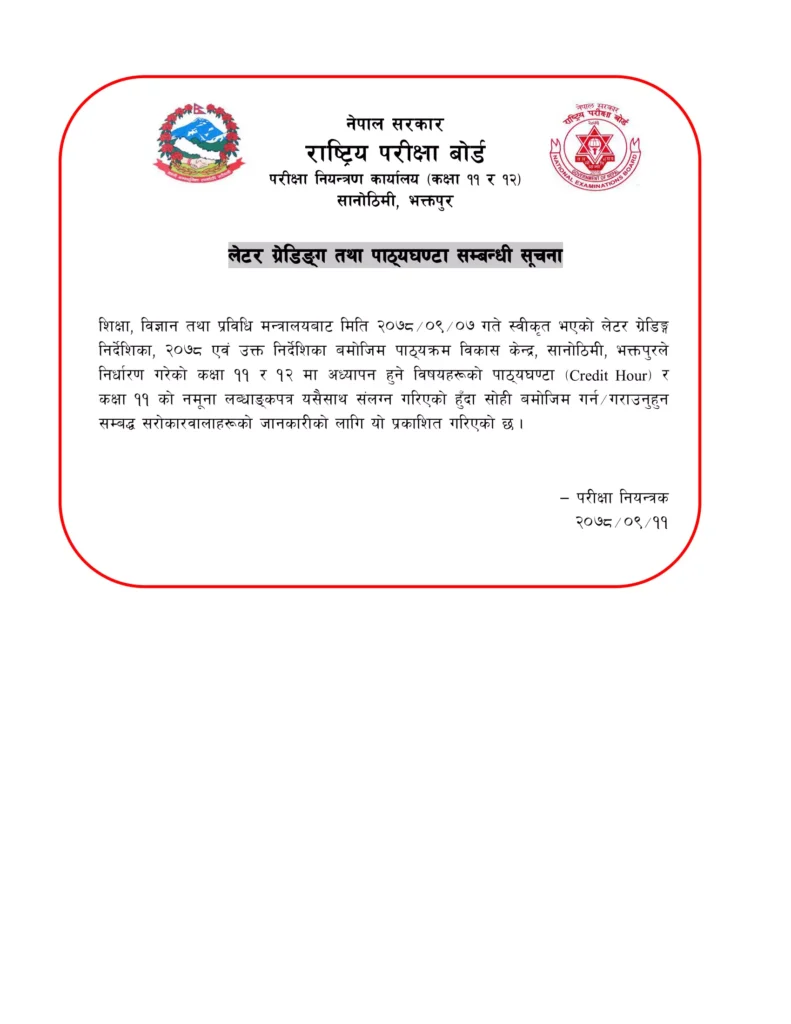
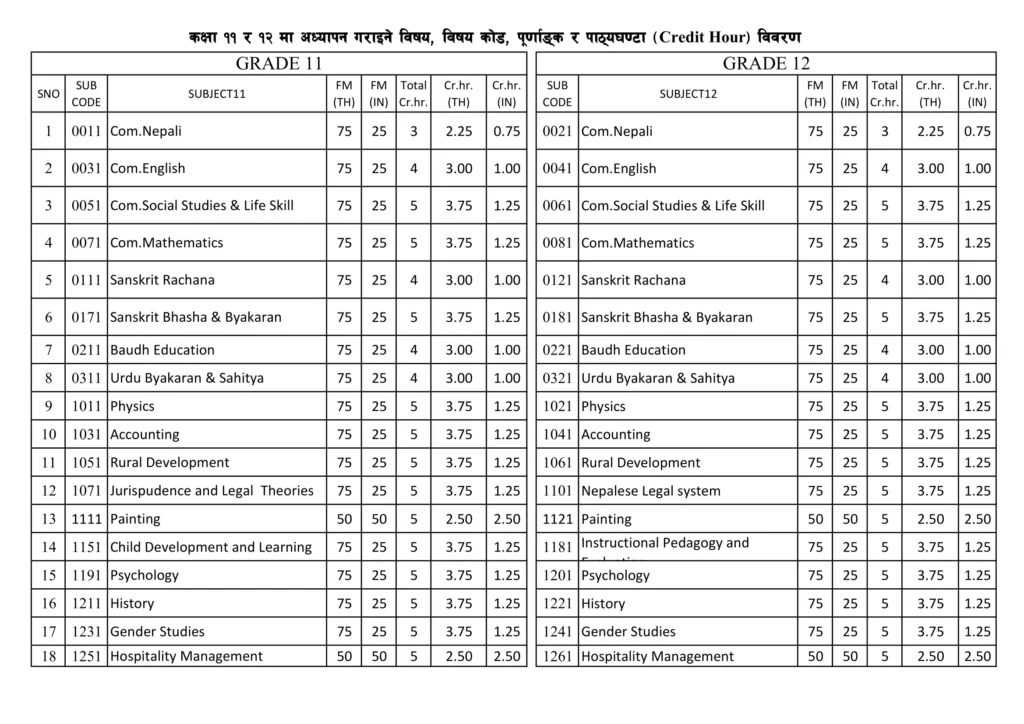
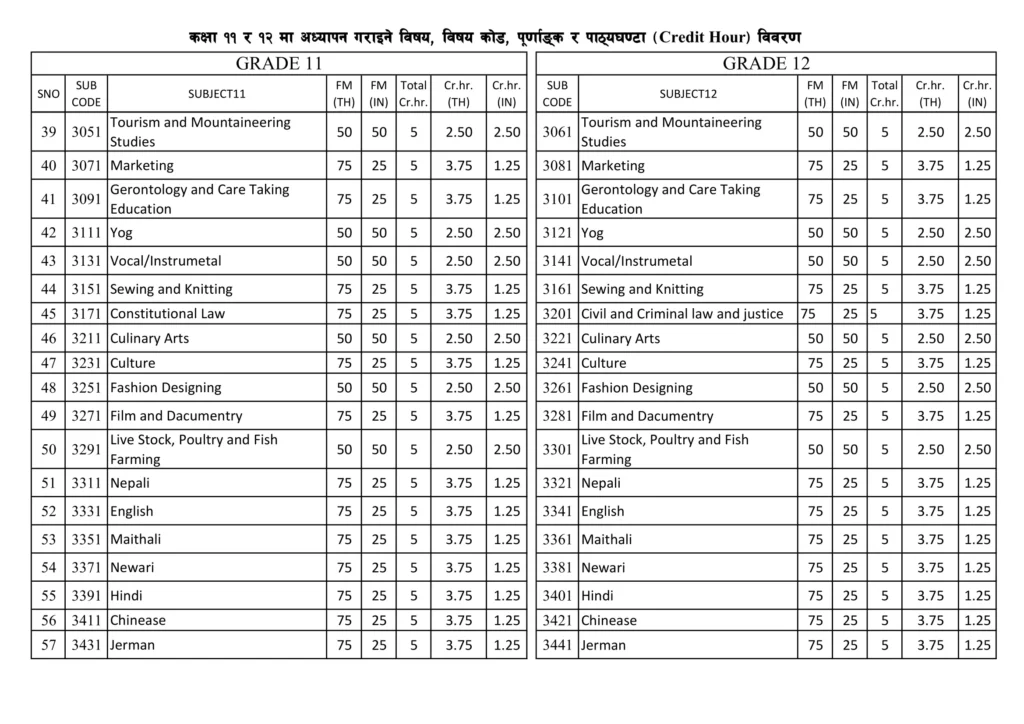
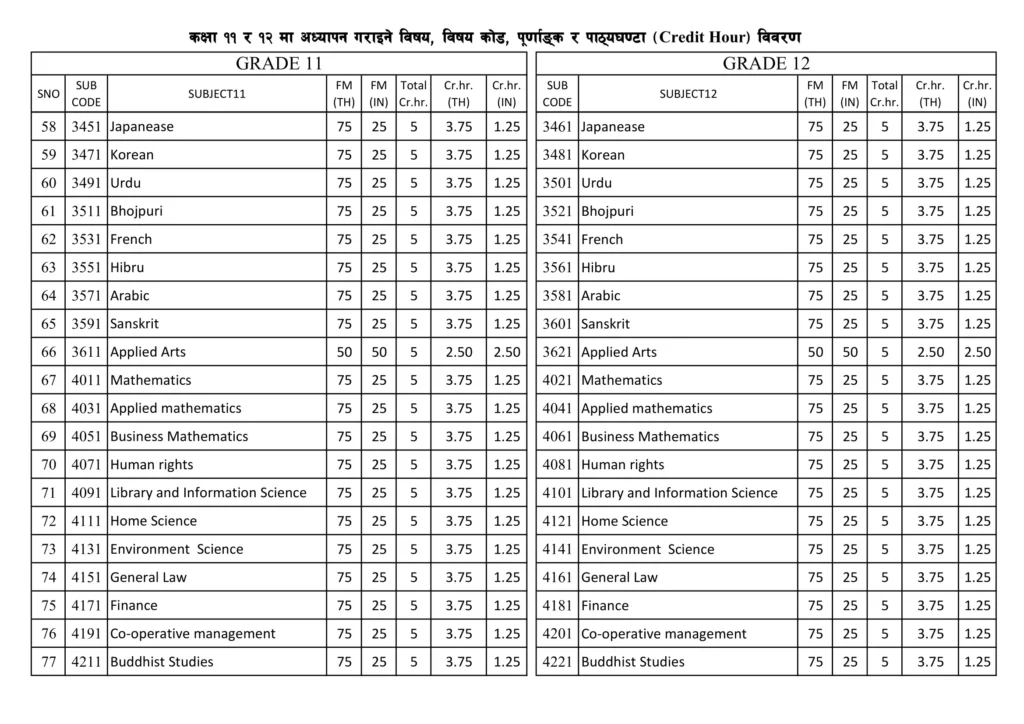
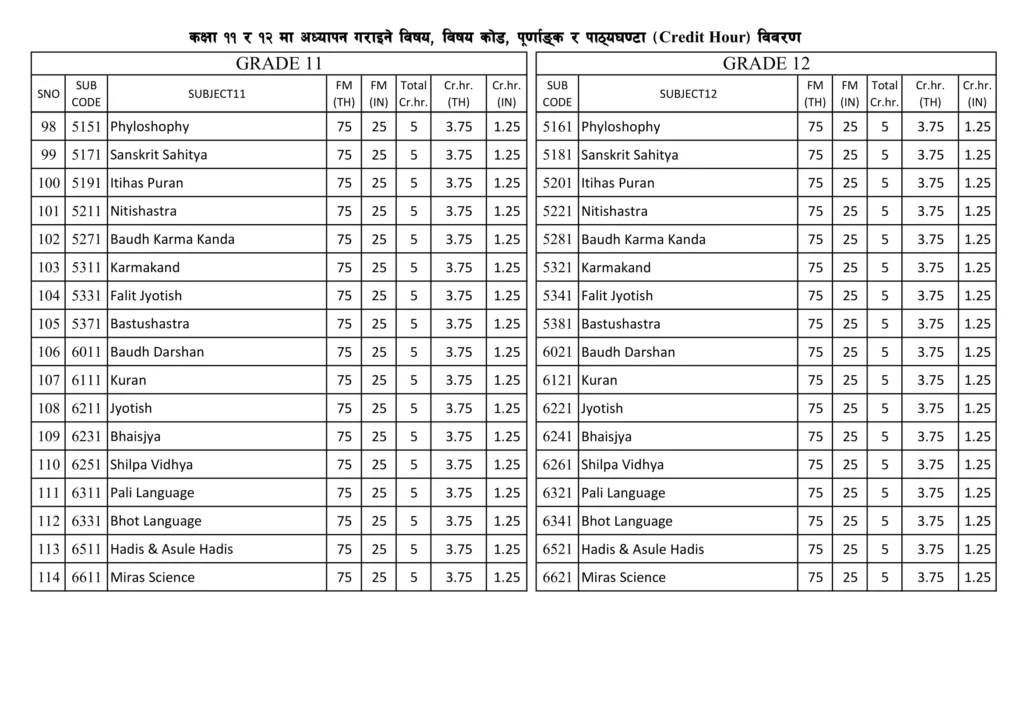
    Decreasing your effort, we have provided a photo of the credit hour of each subject in our article. 

    Latest Grading System of NEB Class 12

    Students who have given the exam and waiting for class 12 results are still unaware of the latest grading system. The latest grading system was introduced in Nepal on 11th Poush, 2078. According to the meeting held on 9th Poush, 2078 they have made this latest grading system. The table of grading systems is as follows:

    Photo of Notice of Grading System
    Notice of Grading System
    Photo of Latest Grading System of Nepal
    Latest Grading System of Nepal
    Photo of Credit Hour Page 1
    Credit Hour Page 1
    Photo of Credit Hour Page 2
    Credit Hour Page 2
    Photo of Credit Hour Page 3
    Credit Hour Page 3
    Photo of Credit Hour Page 4
    Credit Hour Page 4
    Photo of Credit Hour Page 5
    Credit Hour Page 5
    Photo of Credit Hour Page 6
    Credit Hour Page 6

    You can check SEE Result: How to check SEE Result 2080 with marksheet

    Conclusion

    Hope this article cleared all your answers on how to check class 12 results. You know that you can check class 12 results through SMS with Aakash SMS and Sparrow SMS. Similarly, you can check through the website with neb.gov.np official website and neb.ntc.net.np official website. 

    Sample picture of Grade Sheet of Class 12 result
    Sample of Grade Sheet of Class 12 result

    Frequently Asked Questions

  • How To Check NTC Number? Learn Easily In Seconds [Updated]

    How To Check NTC Number? Learn Easily In Seconds [Updated]

    For NTC users, checking the SIM number is always a question. Some people forget their SIM number when they have to give their number to others. Especially when they have bought a new NTC SIM Card and somebody asks them to give their number. 

    I believe that you also have the same problem. You also forget your own SIM number a lot and don’t know how to check the NTC number. So, here are some ways how to know the NTC number when you are in need. 

    Every SIM Card company provides a way to check SIM Card numbers like Ncell, Smart, and NTC. You can simply get your NTC number by following ways:-

    Download Notice

    Remembering your requirements we have answered some questions about what you might ask on Google. Read our whole article and print our article or save our article as a pdf. After that, you will be able to read this article offline too. 

    How to Check NTC Number?

    First, let us clear up this question. Finding the NTC number is complicated for most of the users. They don’t remember the steps to find the NTC number. As a NTC user, I usually have to face this problem. So, here are the steps on how to check the NTC number:

    1. To check the NTC SIM number, you need to dial *9# and call. 
    2. Then your mobile phone will display the SIM number as follows.
    How to Check NTC Number
    How to Check NTC Number
    Display NTC Number
    Display NTC Number

    [Photo]

    You might be confused with the MSISDN:977984XXXXXXX message. The “977” at the front is the country code. You can leave that part and remember the remaining part. Your number is “984XXXXXXX”.

    Type of User Notice

    This step is available only for GSM users but not for CDMA users. 

    How to Check NTC Number Owner Name?

    Now, different SIM Card companies have given services like checking the owner’s name. Similarly, checking the NTC Number owner name service is available in the NTC number too. 

    Here are the steps on how to check NTC Number Owner Name:

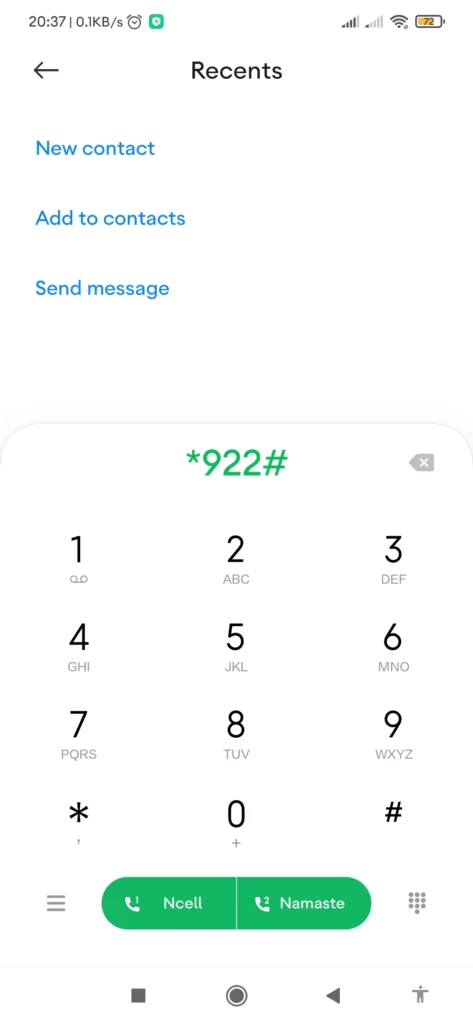
    1. Open Dial Section and dial *922#.
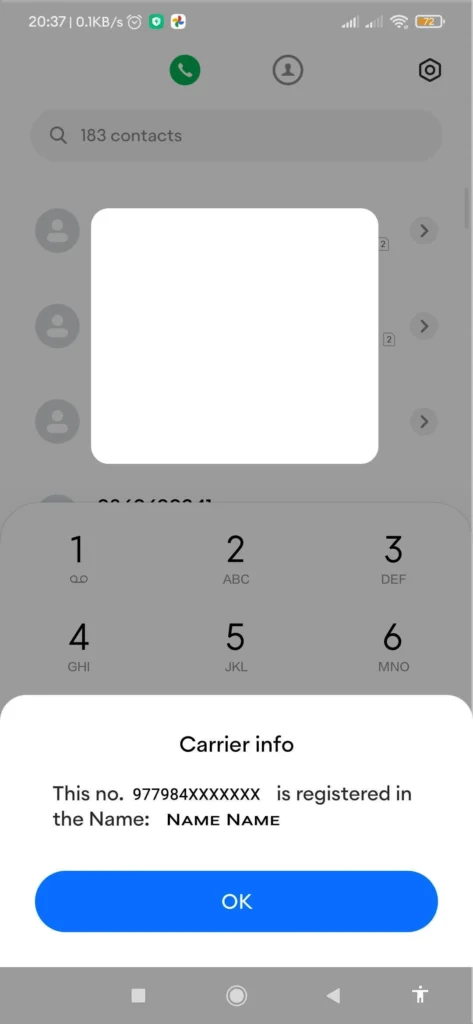
    2. Click on the Call Button. Then you can see the owner’s name.
    How to Check NTC Number Owner Name
    How to Check NTC Number Owner Name
    Display NTC Number Owner Name
    Display NTC Number Owner Name

    You can see the SIM Card number along with the SIM Card owner’s name. This process can be used instead if you want the SIM Card number also.

    Not Available(NA) Notice

    If SIM Card Owner Name is not available then it will display the name as “Unknown”.

    How to Check NTC Number Balance?

    Knowing the balance is another important thing in your SIM Card that you must be well known about. Here are the steps on how to check the NTC number balance:

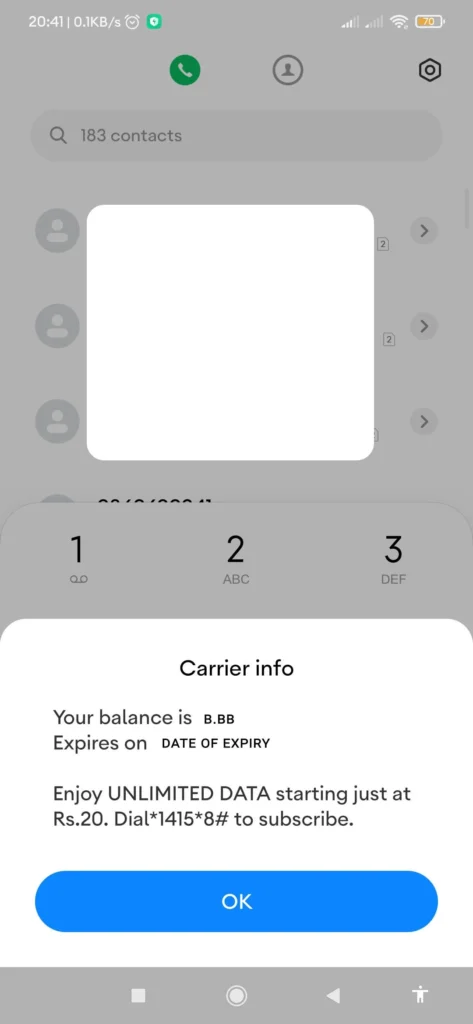
    1. Open the Dial Section and dial *400#.
    2. Click on the Call button. Then your screen displays the message with the balance available in your SIM Card. 
    How to Check NTC Number Balance
    How to Check NTC Number Balance
    Display NTC Number Balance
    Display NTC Number Balance

    Note: You must have to check the expiry date of your NTC number balance. So, in case you might forget, save this article as a pdf so that you can read it in the future. 

    Expiry Date Note

    You must have to check the expiry date of your NTC number balance. So, in case you might forget, save this article as a pdf so that you can read it in the future. 

    Please Note

    When you recharge your CDMA Prepaid phone your new balance will be the sum of your CDMA Prepaid Recharge Card’s Value and the earlier balance left on your phone.

    Please Note

    Now you can check the balance of both NTC and NCELL using same code. Just dial *144# to view your balance. Updated: [21th August 2023]

    How To Identify NTC and Ncell Number?

    Identifying NTC and Ncell numbers is not that hard. You can easily find out this thing with just these few tricks. 

    The NCELL number has the system as “980XXXXXXX” “981XXXXXXX” or “982XXXXXXX”. While the NTC number has the system as “984XXXXXXX”. 

    Just you need to look at the first three digits and then yes you can find the difference. You can know the person who is calling you or whom you are calling is NCELL or NTC SIM. 

    Note: If you need some information about the NTC SIM Card then leave a comment for us. Your comment helps us a lot. 

    Conclusion

    You can check your NTC number through some simple steps. Now don’t worry if you forget your SIM Card number. You can save this article or download this article on How To Check NTC numbers in the future. Forgetting things has always been a psychological problem. As an NTC user, I always forget about the codes that help to check the NTC SIM number, owner name, and balance. 

    You can also check out: Samsung Galaxy A54 5G Price in Nepal || Benco S1 Price in Nepal

    Frequently Asked Questions

  • Best Phones Under 20000 In Nepal : Find Your Budget-Friendly Phone [2023]

    Best Phones Under 20000 In Nepal : Find Your Budget-Friendly Phone [2023]

    Are you looking for the best phones under 20000 in Nepal? Then you are in the right place to start your journey. Here you will get all the price details of the best phones under 20000 in Nepal. 

    We have traversed the entire Nepali market to gain as much information as you need about smartphones. Here, you are going to get the best budget phone in Nepal. Whether you are looking for a phone for regular use or your daily work routine, here you will find every kind of phone available in Nepali markets and e-commerce stores at the best price.

    So without further delay, let’s dive into the hot topic of the best phones under 20000 in Nepal and talk about the best smartphones in Nepal

    Top 6 Best Phones Under 20000 in Nepal [2023]

    In 2023, it’s not a great deal to find a smartphone under NRs 20,000. There are lots of smartphones available on the market at this price. But users are confused about buying devices as they cannot compare their specifications side by side. So here we are to make your work easy. 

    Each of these phones provides a unique set of features and specifications. Here we have given the latest price of the best mobile under 20000 in Nepal

    Here we have arranged the phones based on price, starting from the higher price range to the lower price. So enjoy reading this article.

    1. POCO M5

    The Poco M5 is the best phone that we have on our list. Built with Gorilla Glass 3, I couldn’t stop keeping this smartphone on my first list. Being a fan of its processing speed, this phone is kept on this list.

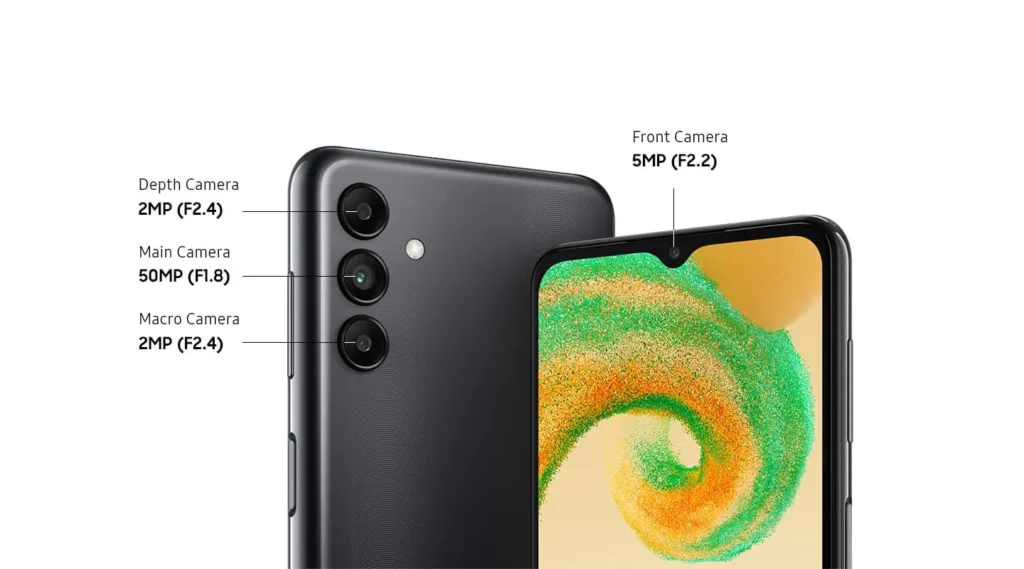
    This smartphone has three cameras: wide, macro, and depth. That means you can click on photos with much more detail. With a 90 Hz refresh rate, it can show us the best performance for gaming. You can call this a gaming smartphone too. So, it is included among the best phones under 20000 in Nepal.

    POCO M5 Price In Nepal
    POCO M5

    POCO M5 Specifications and Price in Nepal:

    Body174 x 76.1 x 8.9 mm (6.46 x 3 x 0.35 inch)
    Display6.58-inch IPS LCD screen, FHD+, 90 Hz refresh rate, Gorilla Glass 3
    ProcessorMediaTek Helio G99 4G (6nm Mobile Platform)
    Memory4/6GB LPDDR4X RAM, 64/128GB UFS 2.2 storage (expandable)
    SoftwareMIUI 13 for  POCO on top of Android 12
    Rear CameraTriple-Camera Setup50MP, f/1.8, wide, PDAF2MP, f/2.4, macro2MP, f/2.4, (depth)
    Front Camera5MP lens (notch)
    Connectivity4G LTE, Dual-SIM (Nano), Bluetooth 5.3, GPS/AGPS/Glonass/Galileo/Beidou, WiFi 802.11 a/b/g/n/ac (Dual-band), USB Type-C
    SecurityFingerprint sensor (side-mounted)
    SensorsAccelerometer, Ambient Light, E-compass, Proximity
    Battery5000 mAh with 18W fast charging (22.5W adapter inside the box)
    Price In NepalNPR 19,999 (4/64GB)
    Price in Nepal: June UpdateNPR 20,499 (4/64 GB)
    You might get the same price before June in most of the stores.
    Specifications of POCO M5

    2. Benco S1 Pro

    Benco is always famous for its better performance and features at a lower price. The Benco S1 Pro also has quite the same niche as the Benco smartphone company. 

    With this NRS 19,999, you are getting a phone with 8 GB of RAM and 256 GB of storage. Isn’t it like a dream? Yes, it’s a dream for a person like us who is looking for a powerful mobile within a budget. This is the main reason why this phone is on my list of the best phones under 20000 in Nepal. 

    With Android 13, the Benco S1 Pro gives the best user experience. Many users love to use its interface. With a triple rear camera setup: 64 MP primary, 2 MP macro, and an AI lens, we can click better photos with it and adjust to the environment quite well.

    Benco S1 Pro Price In Nepal
    Benco S1 Pro

    Benco S1 Pro Specifications and Price In Nepal: 

    Body166.91 x 74.91 x 8.47 mm, 203.4 gm
    Display6.8” FHD+LCD, 60Hz refresh rate
    ProcessorUnisoc T616 4G (12 nm)
    Memory6/8GB RAM, 128/256GB storage (expandable)
    SoftwareAndroid 13
    Rear CameraTriple Rear Camera Setup64 MP primary2MP macroAI lens
    Front Camera16 MP sensor (punch-hole)
    Connectivity4G, WiFi, Bluetooth, GPS, 3.5mm headphone jack, USB Type-C port
    Battery5000mAh battery with 33W fast charging
    Price In NepalNPR 19,999 (8/128GB)
    Specifications of Benco S1 Pro

    What is the price of Benco S1 in Nepal?

    3. Infinix Hot 12 Pro

    Being an Infinix device user, I love its battery services.

    “I love Infinix Hot 12 Pro too much. I used to do gaming on an old Android smartphone which lacked too much. But I bought this smartphone and played games on it. It gave me the best experience. I played continuously for 8 hours but still there was no lack of blockage in the game. The user experience is good. I love this.”

    Remon Shrestha

    I admit that its camera is not quite good compared to others but if you are a gaming person then you will love this device. Mainly this device is used for gaming purposes. This is the future gaming smartphone of this century. So, this phone is included in the list of the best phones under 20000 in Nepal. 

    Infinix Hot 12 Pro Price in Nepal
    Infinix Hot 12 Pro

    Infinix Hot 12 Pro Specifications and Price In Nepal: 

    Body164.22 x 75.75 x 8.42 mm, 191 gm
    Display6.6-inch IPS TFT LCD screen, (1612 x 720), 90 Hz refresh rate, 180Hz Touch sampling rate
    ProcessorUnisoc Tiger T616 Processor (12 nm)
    CPUOcta Core ( 2×2.0 GHz Cortex-A75 & 6×1.8 GHz Cortex-A55)
    GPUMali-G57 MP1
    Memory6GB / 64GB (expandable up to 512GB via dedicated microSD card slot)
    SoftwareXOS 10.6 Based on Android 12 OS
    Rear Camera50MP Primary Camera, f/1.6, (wide), AF + AI lens
    Front Camera8MP selfie camera, f/2.0 aperture
    ConnectivityDual SIM (Nano-SIM, dual stand-by), WiFi 802.11 a/b/g/n/ac, dual-band, Bluetooth, USB Type-C, 3.5mm headphone jack, etc)
    Network4G
    SecurityFingerprint sensor (rear-mounted) and Face Unlock
    BatteryNon-Removable Li-Po 5,000 mAh battery, 18W fast charging support
    Price In NepalNPR 19,899 (6/64GB)
    Specifications of Infinix Hot 12 Pro

    4. Realme Narzo 50A

    Realme Narzo 50A provides an ordinary design, as other smartphones do. But the octa-core processor that it has inside gives a better performance. Combined with the Helio Chipset, this set gives a major boost to the performance of this device.

    We all know about the Realme UI, this is also the best thing that is included in this smartphone. A simple and lightweight device like this can help a lot with getting your work done. 

    Having three types of rear cameras: wide, macro, and depth, helps you click better images and share them with your friends and relatives. This is the best Realme phone under 20000 in Nepal that comes among best phones under 20000 in Nepal. 

    Realme Narzo 50A Price In Nepal
    Realme Narzo 50A

    Realme Narzo 50A Specifications and Price In Nepal: 

    Body164.5 x 75.9 x 9.6 mm, 207 gm
    Display6.5-inch HD+ Mini-drop, 720x1600p, 88.7%, Screen-to-body ratio, 570 nits brightness (Sunlight mode), 88.7% screen-to-body-ratio
    ProcessorMediaTek Helio G85 (912 nm Mobile Platform)
    CPUOcta Core ( 2×2.0 GHz Cortex-A75 and 6×1.8 GHz Cortex-A55)
    GPUMali-G52 MC2
    Memory4GB LPDDR4X RAM, 64/128GB storage (expandable up to 256GB)
    SoftwareRealme UI 2.0 on top of Android 11
    Rear CameraTriple Rear Camera Setup50 MP, f/1.8 (wide), PDAF2MP, f/2.4(macro)2MP, f/2.4(depth)
    Front Camera8MP selfie camera, f/2.0 aperture, 26mm (wide), 1/4”, 1.12micrometer
    Audio3.5mm headphone jack, Loudspeaker
    Connectivity4G LTE, Dual-SIM (Nano), WiFi 802.11 a/b/g/n/ac (dual-band), Bluetooth 5.0
    SecurityFingerprint sensor (rear-mounted)
    Battery6,000 mAh with 18W charging (supports 5W reverse wired charging)
    Realme Nazro 50A Price In NepalNPR 19,499 (4/64GB)
    Specs of Realme Narzo 50A

    You can also check out: Realme 10 Pro 5G Price in Nepal

    5. Samsung Galaxy A04s

    With the Exynos 850 Chipset processor, you are going to get better performance while using this device. This device has Android 12 but if you want to upgrade to Android 13 in the future, you can simply do so. 

    Having a triple camera setup gives you the benefit of taking photos in different kinds of situations. 

    Your security fingerprint is mounted on the side. This feature is loved by everyone nowadays, as it gives a premium look to every device. We especially see this feature with Xiaomi. 

    You are getting a 6,000 mAh battery with this smartphone. That means you should not waste time getting attached to the socket to charge your phone. Charging up to 100% can turn you on for 2 or 3 days continuously. 

    These features forced me to keep this phone on the list of the best phones under 20000 in Nepal. 

    Samsung Galaxy a04s Price in Nepal
    Samsung Galaxy a04s

    Samsung Galaxy A04s Specifications and Price In Nepal: 

    Body164.7 x 76.7 x 9.1 mm, 207 gm
    Display6.5 inches, PLS LCD, 90Hz, 720×1600 pixels
    ProcessorExynos 850 (8nm)
    Memory4/64GB, 4GB/128GB
    SoftwareAndroid 12, upgradable to Android 13, One UI Core 5
    Rear CameraTriple Rear Camera Setup50 MP, f/1.8 (wide), PDAF2MP, f/2.4(macro)2MP, f/2.4(depth)
    Front Camera5MP, f/2.2(wide)
    Audio3.5mm headphone jack
    ConnectivityWiFi 802.11 a/b/g/n/ac, dual-band, Wi-Fi Direct, Bluetooth 5.0
    SecurityFingerprint sensor (side-mounted)
    SensorAccelerometer, Virtual Proximity Sensing
    Battery6,000 mAh with 18W charging (supports 5W reverse wired charging)
    Samsung Galaxy A04s Price In NepalNPR 18,999 (4/64GB)
    Specifications of Samsung Galaxy A04s

    You can also check out: Samsung Galaxy S23 Ultra Price in Nepal || Samsung Mobile Price in Nepal

    6. Xiaomi Redmi 10

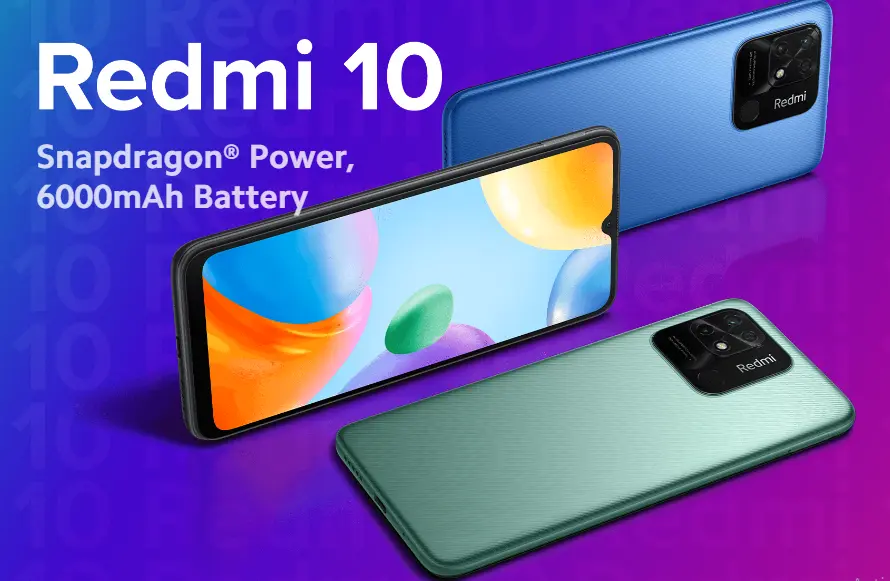
    The Snapdragon 680 chipset has gotten popular in the budget segment with its power efficiency. Redmi 10 has coupled the chip with 6GB of RAM and 128GB of internal storage. This device comes with pre-installed Android 11 based on MIUI 13

    This device is sealed with a 6000 mAh battery giving it a full life for long-lasting performance. Talking about the connectivity it has 2.4+5 GHz Wi-Fi which means it works faster as well as to a longer distance. 

    These features help me to keep Xiaomi Redmi 10 in the list of best phones under 20000 in Nepal. 

    Xiaomi Redmi 10 Price in Nepal
    Xiaomi Redmi 10 Price in Nepal

    Xiaomi Redmi 10 Specifications and Price In Nepal: 

    Body169.59 x 76.56 x 9.13 mm, 203 gm
    Display6.71 inch HD+ LCD, 60Hz, Gorilla Glass 3 Protection
    ProcessorQualcomm Snapdragon 680 4G (7nm Mobile) Platform)
    Memory4GB LPDDR4X RAM, 64/128GB storage UFS 2.2(expandable)
    SoftwareMIUI 13 on top of Android 11
    Rear Camera50MP primary, 2MP depth
    Front Camera5MP (notch)
    Audio3.5mm headphone jack, Loudspeaker
    ConnectivityWi-Fi (2.4GHz + 5GHz) and Bluetooth 5.0
    SecurityFingerprint sensor (rear-mounted)
    Battery6,000 mAh with 18W charging (10W charger in the box)
    Xiaomi Redmi 10 Price In NepalNPR 18,999 (4/64GB)
    Specifications of Xiaomi Redmi 10

    You can check out Redmi Phones in Nepal

    Best Phones Under 20000 in Nepal Price and Availability

    SNBest Phones Under 20000 in NepalPriceAvailability
    1POCO M5NRs 20,499/-Hukut
    2Benco S1 ProNRs 19,999/-Retail stores
    3Infinix Hot 12 ProNRs 19,899/-Authorized Stores
    4Realme Narzo 50ANRs 19,499/-Hukut
    5Samsung Galaxy A04sNRs 18,999/-Hukut
    6Xiaomi Redmi 10NRs 18,999/-Hukut
    Top 6 Best Phones Under 20000 in Nepal

    Best Phones Under 20000 in Nepal
    Best Phones Under 20000 in Nepal

    Other Phones Under 20000 in Nepal Price

    SNSmartphonePrice
    1POCO M2 (6/128 GB)NRs 19,999/-
    2Infinix Hot 10S (4/128GB)NRs 19,990/-
    3Infinix Hot 10 Play (4/64GB)NRs 17,499/-
    4Benco S1 (4/128GB)NRs 14,999/-
    5Benco S1 (6/1F28GB)NRs 15,999/-
    6Motorola Moto E40 (4/64 GB)NRs 18,999/-
    7Redmi 9 Prime (4/64 GB)NRs 17,999/-
    Phones Under 20000 in Nepal

    Final Say About This Article

    After seeing all the specifications, you might have got a clear idea about the smartphones you need to buy in Nepal. Hope this article makes it easy to choose the right device for your budget-friendly device. However, you can check out our other articles for getting more information on other different smartphone prices in Nepal. This article was all about the best phones under 20000 in Nepal.

  • Urgent iPhone iOS update : Security Response Update

    Urgent iPhone iOS update : Security Response Update

    The iPhone iOS update has been a major topic for a few days. Let me tell you that this is not a major version update which comes in about a few years or a long interval of time. The latest iOS update was iOS 16 given by Apple devices and it was released on June 20, 2022. 

    iOS 16 Features

    iOS 15 was pretty nice with its functions and still as the world’s trends and interests keep on changing. So as the time passed it lacked some features in it which had to be fulfilled by another update. Then Apple released its another iPhone iOS update called iOS 16.

    iOS Icon Logo
    iOS Icon Logo

    iOS 16 when released had a number of new features and improvements such as: 

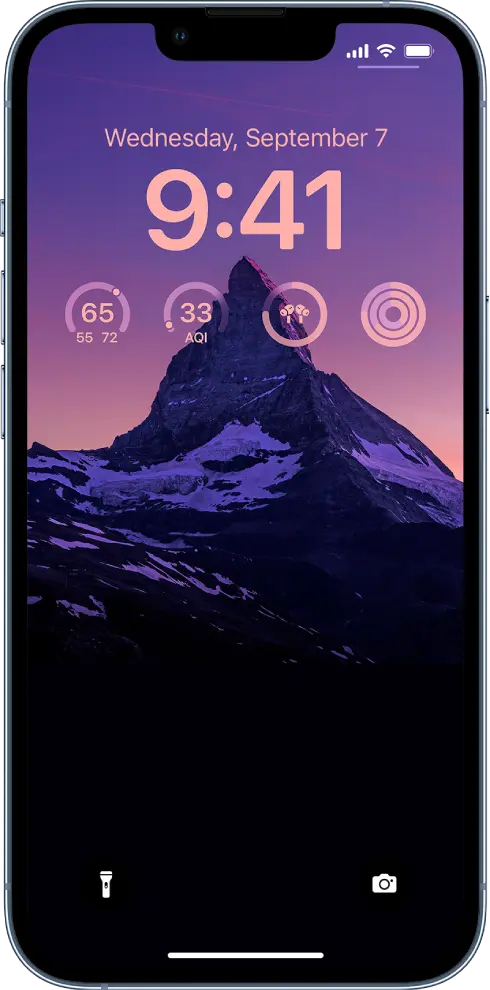
    • A redesigned lock screen with widgets and support for Focus modes. 
    • Messages with new features like Shared with You and the ability to edit and delete messages. 
    • Maps with new features like augmented reality(AR) directions and improved transit directions. 
    • Wallet with support for more cards and keys. 
    • Health with new features like medications and the ability to share health data with others. 
    • Privacy with new features like Mail Privacy Protection and Hide My Email.
    • Accessibility with new features like Live Captions and Sound Recognition. 
    iPhone New Lock Screen
    iPhone New Lock Screen
    iPhone iOS Widgets
    iPhone iOS Widgets

    Note: iOS 16 is available for iPhone 8 or later. 

    How to update iOS 16?

    You can get your iPhone iOS updates within your device. Just you need to follow the following steps to get the latest iOS version. 

    1. Go to Settings.
    2. Go to General.
    3. Go to Software Update.

    What do we have in the iPhone iOS update released this week? 

    You might be waiting for the iOS 16.6 update as Apple was working on it. It has already given five betas that have been released to the developers. After knowing this thing and waiting for the iPhone iOS 16.6 update, getting the iOS 16.5.1 update is a surprise for many iPhone users. So why did Apple release iPhone iOS update suddenly when everyone was prepared for another update which was soon going to launch. 

    iPhone iOS Update Screen
    iPhone iOS Update Screen

    Introduction to iPhone iOS update this week

    Apple has released a Rapid Security Response (RSR). And it’s not some huge update that you need to worry about. This is tiny as 3MB and fast to install. This tells us that it is an urgent iOS update given by Apple. Now, this update became the latest iOS version for Apple devices. 

    What was the Change in this update?

    In this iOS 16 update, they have solved only one issue: security issue. It was the main reason why they had given us this update in the middle of work on 16.6. The iOS updates include non-security elements. 

    Effect of this iPhone iOS update

    Just after some hours of this iOS update, Apple pulled it an unprecedented move. This iOS 16.5.1 update had caused a headache for websites like Facebook, Zoom and Instagram which weren’t behaving as they should have to. 

    Then after a few hours, Apple released a support document explaining about the incident and what will happen after that. Here’s what they have said. 

    “Apple is aware of an issue where this Rapid Security Response might prevent some websites from displaying properly. Rapid Security 16.5.1(a) and iPadOS 16.5.1 (b) will soon be available to address this issue.”

    https://support.apple.com/en-us/HT213827

    How to remove this update 

    If any kind of issue occurred while updating your iOS version then your can remove it simply by following these steps:

    1. In Settings > About > iOS Version , tap “Remove Security Response” . Then tap Remove to confirm.

    If you have installed macOS then the same thing will apply over there too. Apple says 

    “Apple is aware of an issue where this Rapid Security Response might prevent some websites from displaying properly. Rapid Security Response macOS 13.4.1(b) will be available soon to address this issue.” 

    https://support.apple.com/en-qa/HT213825

    You can choose to remove Rapid Security Response (a): Choose Apple menu > About this Mac > and click More Info. Under macOS, click the Info (i) button next to the version number. Click Remove and Restart, and then click to confirm.

    Which iPhone can run this update?

    Apple iPhone iOS update runs on all iPhones released in 2017 or later. Here are the list of iPhone devices that can run the iOS 16.5.1 update: 

    1. iPhone 8
    2. iPhone X
    3. iPhone XR
    4. iPhone XS / XS Max
    5. iPhone 11
    6. iPhone 11 Pro / 11 Pro Max
    7. iPhone SE
    8. iPhone 12
    9. iPhone 12 Mini
    10. iPhone 12 Pro / 12 Pro Max
    11. iPhone 13
    12. iPhone 13 Pro / 13 Pro Max
    13. iPhone SE
    14. iPhone 14
    15. iPhone 14 Pro / 14 Pro Max

    Conclusion

    In conclusion, we can say that the iPhone iOS update which we got this week is a minor iOS update. This latest iPhone version solved the security issue. You can get your iOS 16 update or download it on your Settings. 

    You can check out this article. You have all the things required for you to know about this latest version of iOS. Hope you liked our article. 

  • Instagram Threads App: Is it the same as Twitter?

    Instagram Threads App: Is it the same as Twitter?

    Instagram Threads App is a new app which is built by the Instagram team for sharing text updates and joining public conversations. It is a newly launched app released on June 27, 2023, and the Instagram team is still working on Instagram Threads App to make it compatible with open, interoperable social networks. 

    Mark Zuckerberg has just announced the initial version of the Threads app. Whether you are a creator or a casual poster, Threads provide you with a platform for separate space for real-time updates and public conversations. 

    You can check out our other articles: Redmi Note 11 Pro Price in Nepal || Dell Vostro 3400 Price In Nepal

    Who should we consider the owner?

    It is really a tough question to answer about the owner of the Threads app. Let me tell you why in some steps and make it clear who can be considered as the real owner of Instagram Threads App. 

    1. Actually Threads App is officially made by the Instagram app. If you go over Play Store to download this app, you will see their Instagram as the owner of the app. Play Store always needs the owner’s details to upload applications for users’ privacy and security. And Instagram Threads App is officially uploaded with the ownership of Instagram. 
    2. As we all know that Instagram is officially a social media company of Meta, a renowned company. So, here we can also say that Meta is the owner of the Thread company as it is the head branch of Instagram too. 
    3. Here comes the third phase, Meta is owned by Mark Zuckerberg(CEO of Meta company). So, who should we consider as the owner of the Instagram Threads App? 
    Threads App Logo
    Threads App Logo

    It’s not really a tough thing to say as most people would probably say it’s obviously Mark Zuckerberg but what if we talk about the company? Which company owns the app? Is it Instagram or Meta? So, here I would like to say Instagram. 

    Instagram or Meta: Who is the owner?

    I know what you are gonna say after reading the above thing. But the fact is, the Instagram company is the real owner of the Instagram Threads App. 

    Instagram is not the real property of Mark Zuckerberg and he is not the founder of it either. Instagram was created by Kevin Systrom and Mike Krieger. Then later Meta bought it. You can check out the question: Who is the owner of Instagram? It will prompt you with an answer i.e. Meta.

    Instagram is itself a separate company so it’s better to say that Instagram Thread App is owned by Instagram as officially written in Playstore. 

    How to get started with Instagram Threads App?

    1. Open Threads App. 
    2. Threads will automatically recognize your logged-in Instagram account. 
    3. You can import your Instagram details into the Threads App and start.
    4. Or, you can manually fill in all the details. 
    Threads App Profile Setup
    Threads App Profile Setup

    What you can do with Instagram Threads App?

    • Access your Instagram followers

    Your Instagram username and verification badges are reserved for you. Automatically follow the same accounts you follow on Instagram in a few taps, and discover new accounts too. 

    Threads App has already got a username reserved which has been used in your Instagram. So, you are going to get the same username as Instagram. This feature could be loved by most users. Analysts have really used their business minds over there. Nobody would love to have several usernames on different platforms and remember all of those. 

    • Share your point of view

    Spin up your new thread about what’s on your mind. This is a space to be yourself, and you control who can reply.

    Threads App New Thread
    Threads App New Thread
    • Connect with friends and your favorite creators

    Jump to the replies to get in on the action and react to commentary, humor, and insights from the creators you know and love. Find your community and connect with people who care about whatever it is you’re interested in. 

    Threads App Search Users
    Threads App Search Users
    • Control the conversations

    Customize the settings and user controls to manage who can see your content, reply to their threads, or mention you. Accounts you’ve blocked will be carried over from Instagram, and they are enforcing the same Community Guidelines to help ensure everyone interacts safely and authentically. 

    • Find ideas and inspiration

    From TV recommendations to career advice, get answers to your questions or learn something new from crowd-sourced conversations, thought leaders, and industry experts.

    Threads App News Feed
    Threads App News Feed
    • Never miss a moment

    Stay on top of the latest trends and live events. Whether it’s about new music, movie premiers, sports, games, TV shows, fashion, or the latest product releases, find discussions and receive notifications any time your favorite profiles start a new thread. 

    • Open social networking – Coming Soon 

    In the future, there will be ways to discover more content and reach wider audiences. 

    Note

    These are the features enlisted by Meta’s Thread App in Playstore. You can get your app from here….

    Does Instagram Threads App have security?

    Don’t worry! Instagram Threads App doesn’t sell or steal your data. But it needs some permissions to be granted from your device. Here are some of the few things in your device which are accessed by the Threads App. 

    1. Location
    2. Microphone
    3. Identity 
    4. Contacts
    5. Photos/Media/Files
    6. Wi-Fi Connection Features
    7. Camera
    8. Storage
    9. Receive data from the internet
    10. Part with Bluetooth devices
    11. Run at startup
    12. Draw over other apps
    13. Prevent the device from sleeping
    14. View network connections
    15. Reorder running apps
    16. Use accounts on the device
    17. Control vibration
    18. Control audio settings
    19. Full network access

    Data shared

    1. Name
    2. Email Address
    3. User Ids
    4. Phone Number
    5. Device or other ID

    Data Collected

    1. Location (Approximate and Precise Location)
    2. Personal info (Name, Email Address, User IDs, Address, Phone Number, Political or religious beliefs, Sexual orientation)
    3. Financial information( User payment info, purchase history, credit score)
    4. Health and Fitness Info
    5. Messages 
    6. Photos and Videos
    7. Audio
    8. Files and Docs
    9. Calendar
    10. Contacts
    11. App activity 
    12. Web browsing
    13. App info ( Crash logs, Diagnostics)

    Now you might be thinking that it is really safe after seeing that Instagram Threads App is collecting these numbers of data from us. Like other social media apps, it also collects data to optimize its system so that you will get the best user experience. 

    You can check out our other articles: Benco S1 Price in Nepal || Redmi Note 11 Price in Nepal

    Conclusion

    Sampurnatech Threads Profile
    Sampurnatech Threads Profile

    We are online in Instagram Threads App too, So do follow us over there. Click here to follow.

    Frequently Asked Questions

  • How to check SEE Result 2080 with Marksheet?

    How to check SEE Result 2080 with Marksheet?

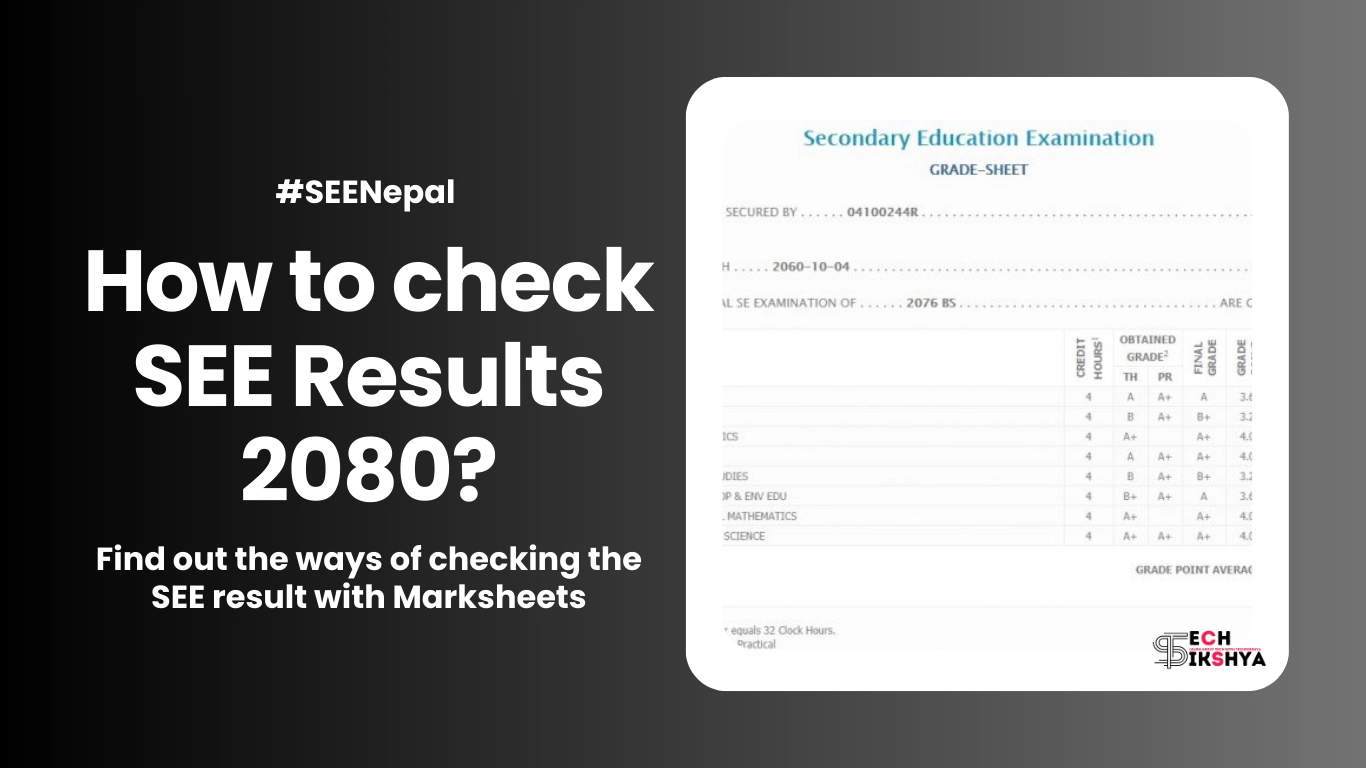
    SEE Exam 2079/80 was held in Chaitra starting from 17th Chaitra, 2079 to 26th Chaitra, 2079. There is a rumor that SEE Result is going to be published in the fourth week of Ashad. So, here we are to give you information about how you can check SEE Result 2080 with Marksheet. 

    The National Examination Board(NEB) has announced that they had already finished checking copies in the third week and started to take entry marks online from 17th Ashad,2080. Now, NEB is doing the final preparations to get entry marks and verify them before publishing SEE Result 2080. 

    According to official sources, we have got the information that NEB has called a meeting today (19th Ashad, 2080) for the result publication. But due to some technical errors during marks entry and verification, it has been postponed until the next notice. 

    But NEB has confirmed that the exam will be published till Friday if any kind of technical error won’t occur in the system. Let’s wait for the result.

    Ways to check SEE Result 2080 with Marksheet

    I know you have been waiting too long to see your SEE Result 2080  with a marksheet and thinking about how you can view it. No worry about it, now viewing the result marksheet has become way easier. You no longer have to see your result in newspapers like Gorkhapatra like in the past days. Students can now check the result with mark sheets through different apps and online websites. You can see SEE Result 2080 through: 

    1. Websites 
    2. SMS
    3. IVR

    Check SEE Result 2080 with Marksheet through Websites

    First, let me tell you that there are certain organizations that will have permission to publish SEE Result 2080 with marksheet as per the government announcement. Here are some of the websites which will be publishing the result online with mark sheets for sure. 

    In order to check your SEE result, you must have to know your symbol number first. If you don’t know your symbol number then you can check it on your admit card which you got from your school during the SEE examination.

    SEE Official Website of SEE Result 2080 with Marksheet
    SEE Official Website
    NEB Official Website
    NEB Official Website

    Through see.gov.np

    Go to  http://result.see.gov.np/Result and enter your symbol number and date of birth with other necessary details.

    Through see.ntc.net.np

    Go to https://see.ntc.net.np/ and enter your symbol number and date of birth with other necessary details.

    Through neb.gov.np

    Go to https://www.neb.gov.np/results and enter your symbol number and date of birth with other necessary details.

    Check SEE Result 2080 with Marksheet through SMS

    SEE Result Through SMS
    SEE Result Through SMS

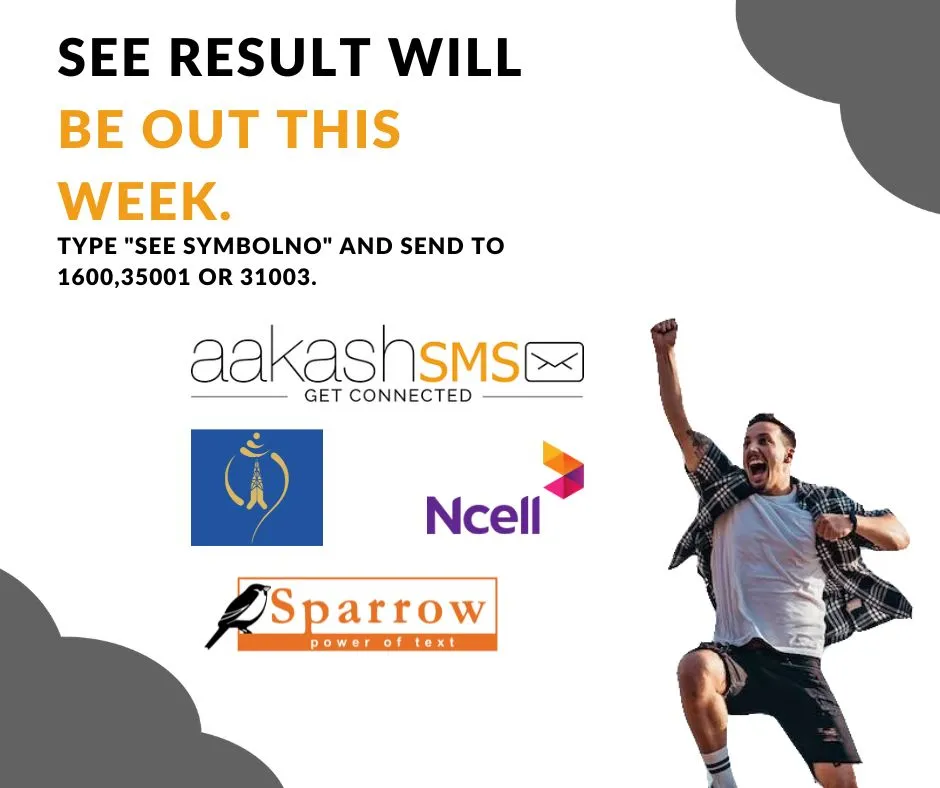
    As soon as the SEE Result 2080 is going to get published then many students are going to open the websites at the same time which will increase the traffic on the website. Any website would not be able to handle this much traffic. So, you can check your result through sms easily. But you cannot check SEE Result 2080 with Marksheet through sms. 

    Here are the steps you can follow to check SEE Result 2080 with marksheet:

    1. Open the messaging app on your phone. 
    2. Type “SEE” followed by a space and symbol number. (eg: SEE 0121323D)
    3. Send this message to the number 1600.
    4. After a while, you will receive your SEE result in your message box. 

    You can also check the SEE Result 2080 with marksheet through Sparrow SMS as they are also authorized to provide SEE result:

    1. Type SEE and space then symbol number.
    2. Send the SMS to 35001.

    Example

    Send a message like “SEE 0121323D” to 35001

    You can check the result through Akash SMS too:

    1. Go to the messaging app on your device.
    2. Type SEE  and space then symbol number.
    3. Send the SMS to 31003.

    Example

    Send a message like “SEE 0121323D” to 31003

    Get Result Through SMS
    Get Result Through SMS

    Check SEE Result 2080 with Marksheet through IVR

    You can also view the SEE Result 2080 through Interactive Voice Response System(IVRS). This helps you to hear results with landlines and phones. 

    You can check to see the result through IVR by following the steps:

    1. Dial the number 1600. 
    2. Follow the instructions to obtain your SEE Result. 

    You will be charged Rs. 2 per minute for a single symbol number as per our latest news.

    Note

    The marksheet downloaded from the websites will not be considered valid. Hence, students need to collect their original mark sheets from their respective schools.

    How schools can check SEE Result 2080 with Marksheet?

    Schools can download Mark Ledger of their school by entering the following link:

    1. Go to https://seeadmin.ntc.net.np/
    2. Enter your school code given by the education office.
    3. Enter your one symbol number of valid students.
    4. Enter the date of birth in YYYY-MM-DD format of the above symbol number.
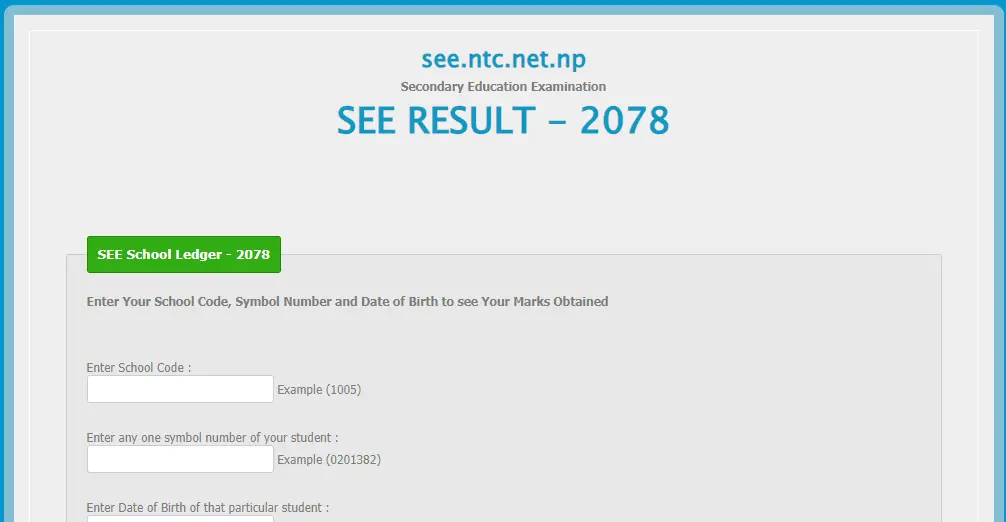
    5. Click the Submit button to download.
    SEE Admin Page for Ledger
    SEE Admin Page for Ledger

    Grading System for SEE or Grade 10

    Why Redmi Phones are popular nowadays? Check out Redmi Phones over here…

    Conclusion

    In conclusion, I hope all the students get good marks in SEE Result 2080. After you have passed, you need a list of smartphones with their prices. Click here for smartphone prices.

    Want to buy a cheap laptop for further study: Here’s Dell Vostro 33400 Price in Nepal || Dell Inspiron 15 3511

    Frequently Asked Questions

  • MIUI 15 Beta Version With Android 14: The Cutting Edge Feature

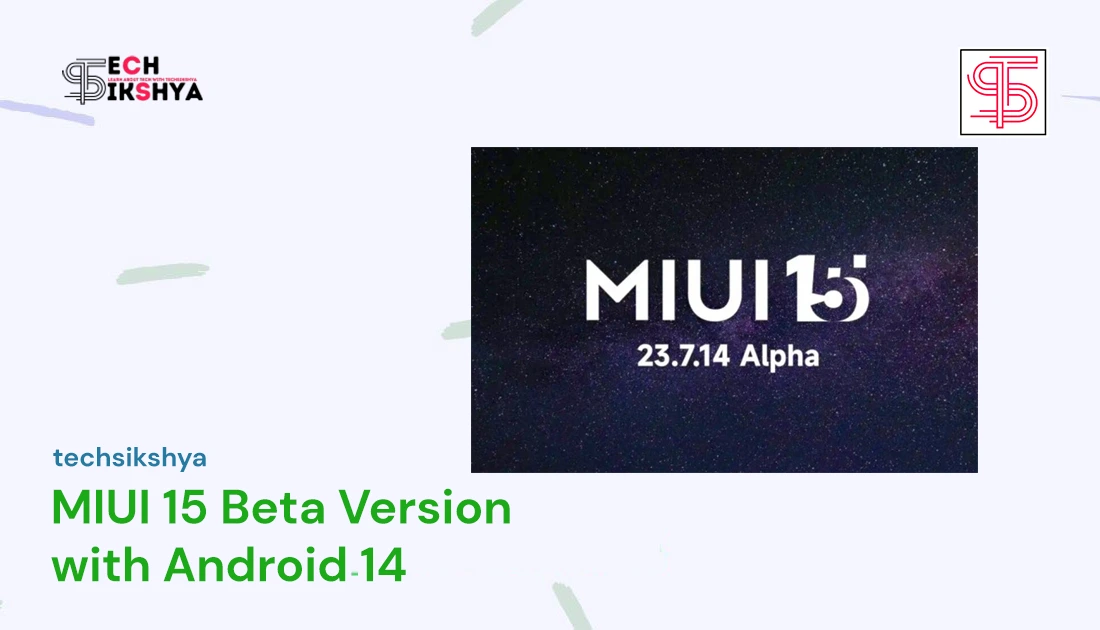
    MIUI 15 Beta Version With Android 14: The Cutting Edge Feature

    MIUI 15 Beta Version Android 14 is available now in the market as per the Android 14 Developer Preview Program. Android Developer Preview Program provides you with all the features and development needed for the next version of Android. For now, Xiaomi 13 Pro, Xiaomi 13, and Xiaomi 12T are available for this program, which is free for developers to use. You can quickly install the preview build and start to use it right away. 

    Before going to the brief overview of it, let’s understand what MIUI or MIUI ROM is. MIUI basically is a customizable and user-friendly ROM. It has got features like a reimagined home screen, flexible and intuitive design, optimized backend(light-weight), and privacy.

    Before You Upgrade:

    After you hear this news, I am pretty sure that you will try to upgrade your ROM as soon as possible to get the best user experience. So, here are a few things you must have to remember before you upgrade to MIUI 15 Beta Version Android 14:-

    1. Don’t forget to back up your data before you upgrade to MIUI 15 Beta Version Android 14.
    2. Please download the Android 14 Beta build for Xiaomi 13 Pro, Xiaomi 13, and Xiaomi 12T.
    3. Please opt-in to the Android 14 Beta build using the fastboot method

    Later, if you would like to revert-back to the factory settings, you can do so through the fastboot mode:

    1. Turn off the Device. 
    2. Press the Volume down button and Power button at the same  time for fastboot mode. 

    (Note: You can check out about the fastboot method over here….)

    Things You Need to Know about MIUI 15 Beta Version

    This MIUI 15 Beta Version Android 14 is going to be a big update after the announcement of Google in Google I/0 2023 event held recently. At this conference, Google has released its Android 14 Beta version for different smartphone companies. And Xiaomi became one of the brands to bring the updates to its following three brands: Xiaomi 13 Pro, Xiaomi 13 and Xiaomi 12T. 

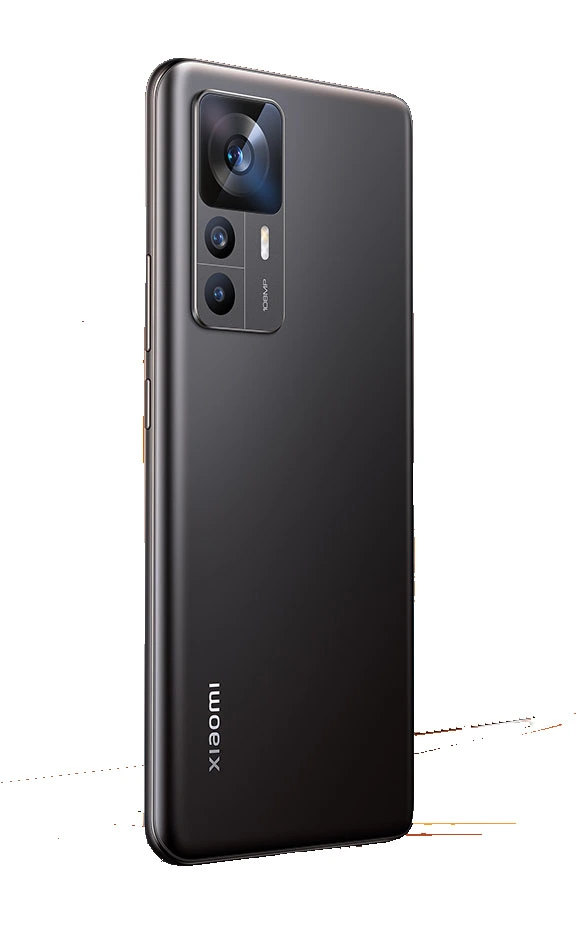
    Xiaomi 13
    Xiaomi 13
    Xiaomi 13 Pro
    Xiaomi 13 Pro
    Xiaomi 12T
    Xiaomi 12T

    What’s New in MIUI Beta Version Android 14 

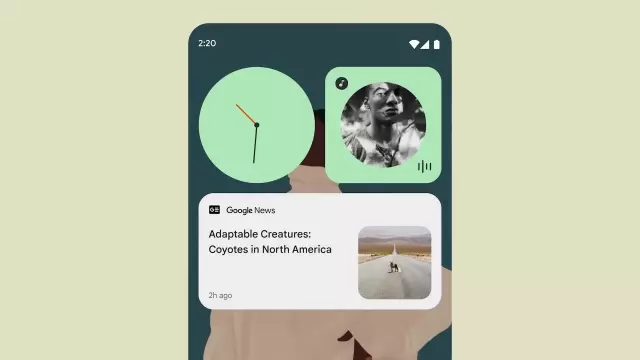
    Many updates were mentioned in the Google I/O 2023 event. Let me tell you in short, Google had mentioned features like: More customizable lock screens, Artificial Intelligence(AI) created wallpapers, redesigned back gestures, and per-app language support.

    Customizable Lock Screen - MIUI 15 Beta Version
    Customizable Lock Screen

    Xiaomi Android 14 Stages

    Android 14 will be released in different stages such as Beta 1-2-3 respectively. According to Google Android 14 Beta Version should be released by the “End of July”. Updates are being tested internally so that you will get the best experience despite getting the update earlier than expected for these three Xiaomi devices for better user experience. Let’s assume that the MIUI 15 Beta version will stop at the “End of August” and the stable version will be released in “Mid-October”. Till then let us wait patiently. 

    Xiaomi Android 14 Eligible Devices

    With the release of Android 14 in MIUI 15 Beta Version, Xiaomi has released a list of devices which will be getting an android update soon to upgrade to Android 14 soon. Here are the list of Android 14 eligible devices:

    1. Xiaomi 14 Pro
    2. Xiaomi 14
    3. Xiaomi 13 Ultra
    4. Xiaomi 13 Pro
    5. Xiaomi 13T Pro
    6. Xiaomi 13T
    7. Xiaomi 13
    8. Xiaomi 13 Lite
    9. Xiaomi 12
    10. Xiaomi 12 Pro
    11. Xiaomi 12X(uncertain)
    12. Xiaomi 12S Ultra
    13. Xiaomi 12S Pro
    14. Xiaomi 12S
    15. Xiaomi 12 Pro Dimensity Edition
    16. Xiaomi 12 Lite
    17. Xiaomi 12T
    18. Xiaomi 12T Pro
    19. Xiaomi 11T
    20. Xiaomi 11T Pro
    21. Xiaomi Mi 11 Lite 5G
    22. Xiaomi 11 Lite 5G NE
    23. Xiaomi Mi 11 LE
    24. Xiaomi Mi 11
    25. Xiaomi Mi 11 Ultra
    26. Xiaomi Mi 11 Pro
    27. Xiaomi MIX 4
    28. Xiaomi MIX FOLD
    29. Xiaomi MIX FOLD 2
    30. Xiaomi FOLD 3
    31. Xiaomi CIVI 1S
    32. Xiaomi CIVI 2
    33. Xiaomi CIVI 3
    34. Xiaomi Pad 5 Pro 12.4
    35. Xiaomi Pad 6
    36. Xiaomi Pad 6 Pro 

    Redmi Android 14 Eligible Devices

    1. Redmi Note 12T Pro
    2. Redmi Note 12 Turbo Edition
    3. Redmi Note 12 Speed
    4. Redmi Note 12 5G
    5. Redmi Note 12 4G
    6. Redmi Note 12S
    7. Redmi Note 12R
    8. Redmi Note 12 Pro 5G
    9. Redmi Note 12 Pro+ 5G
    10. Redmi Note 12 Discovery Edition
    11. Redmi Note 11T Pro
    12. Redmi Note 11T Pro+
    13. Redmi Note 11R
    14. Redmi K60
    15. Redmi K60E
    16. Redmi K60 Pro
    17. Redmi K50
    18. Redmi K50 Pro
    19. Redmi K50 Gaming
    20. Redmi K50i
    21. Redmi K50 Ultra
    22. Redmi K40S
    23. Redmi 11 Prime
    24. Redmi 11 Prime 5G
    25. Redmi 12C
    26. Redmi 10 5G
    27. Redmi Pad
    28. Redmi Pad 2
    29. Redmi Pad 2 Pro

    POCO Android 14 Eligible Devices

    1. POCO M4 5G
    2. POCO M5
    3. POCO M5s
    4. POCO M4 Pro 5G
    5. POCO X4 GT
    6. POCO X5 5G
    7. POCO X5 Pro 5G
    8. POCO F5 Pro 5G
    9. POCO F5
    10. POCO F4

    Where Can You Get

    Now here comes the question. Where can we get MIUI 15 Beta Version Android 14? Is there any link to get it? Are there any software applications to download? Those who want to access Android 14 should download MIUI downloader so that you can also be in the list of MIUI 15 Beta Version. Click here to access MIUI downloader. We have shared the details of MIUI Beta Version. Follow us for more exciting articles like this.

    Frequently Asked Questions

  • Punch Hole Display: Our Future Display

    Punch Hole Display: Our Future Display

    Punch hole display, also known as hole-punch display or camera cutout display, is a design that maximizes the screen-to-body ratio and minimizes the bezels combining the selfie camera directly into the display. 

    At first, this display was installed on the Samsung Galaxy A8s around December 2018. At the time, the Galaxy A8s featured a circular cutout in the top left corner of the screen to house the selfie camera. This design was like a setting sun for the notch design that was popularized by the iPhone X in 2017. 

    After that, many smartphone manufacturers have adopted these displays in their devices. Samsung continued to use this design in its Galaxy A series and Galaxy S series smartphones as it gained popularity among smartphone users. Other companies like Huawei, OnePlus, Motorola, and Xiaomi have also released devices with punch-hole displays in different shapes and sizes. Benco S1 also has this design, which has been reviewed by one of our reviewers.

    Punch Hole Display
    Punch Hole Display

    These displays are typically oval and are located in the top center or top corner of the screen. It houses a selfie camera and sometimes additional sensors like ambient light sensors or proximity sensors. Its size varies depending on the smartphone manufacturers and models.

    Pros of Punch Hole display:

    1. Increased body-to-screen ratio: This results in an immersive viewing experience and offers a larger viewing area for the users. You can watch videos on a bigger screen. 
    2. Retained Front Camera Functionality: Users can still click photos, record videos and use facial recognition features without compromising camera quality and performance. 
    3. Aesthetically Pleasing Design: This display blends more with the screen, providing a better design to the display. 

    Cons of Punch Hole display:

    1. Visual Distraction: This display seems like a disturbance to the viewing area especially when you are watching videos. The videos will be a black water droplet-like structure hiding some parts of the videos. 
    2. Limited Placement Options: Manufacturers won’t get more options while placing it over the display screen as it needs to be adjusted in a proper place. 
    3. Hamper website: Many websites over the internet are not well designed to get adapted for the punch hole display. So, it may not be good to view those websites better. 
    Punch Hole and Notch Displays
    Punch Hole and Notch Displays

    Conclusion: 

    These displays are out of the way when it comes to providing a body-to-screen viewing experience. Due to this aesthetic feature, this design has been gaining popularity among smartphone users in the market. This is our future as this design creates an exclusive immersive viewing experience for smartphone users. As a reviewer for this website, I would love to say that I am in love with this design. After watching the latest movies, I found that this design is better when it comes to watching videos with unlimited screen capacity.

    Frequently Asked Questions

  • School Management System: Next Level with Excel Features

    School Management System: Next Level with Excel Features

    For normal schools, the school management system has always been a headache for the past few years. As the country is developing and stepping towards modern society, the schools also must move forward in the context of their management system. Many of the schools in Nepal are still stuck in their paper-based work while other modern societies have moved so forward. Now it is hard to catch their pace. So, here comes a new management system with some extraordinary features. Would love to see the next-level features that none have seen till now using Excel. 

    Let us not forget that there are many school management software engineered by software developers or web developers using programming languages like Java, PHP, and JavaScript. Some also use free website-building tools like WordPress as a platform to develop this software. But they are very expensive to buy for ordinary schools like in village areas that struggle to fulfill their basic demands too. So, here’s a brief introduction to the school management system.

    School Management System Specs

    Tools UsedGoogle Sheets
    FeaturesStudent Details Management
    Student Results Management
    Report Card Generation
    Student Attendance
    Extra featuresDepends on your device’s performance
    ScalabilityYes
    PerformanceDepends upon your device’s performance
    Price Negotiable around 1K
    School Management System – Specs Table

    You may also like: Samsung Galaxy S23 Price in Nepal || iPhone 14 Pro Max Specs and Price in Nepal

    School Management System – Overview

    Student Details Management

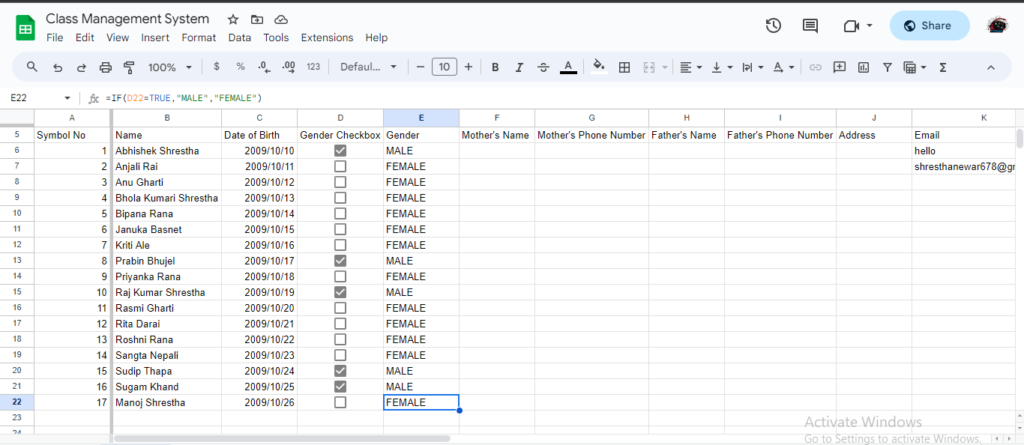
    The Student Management System or Student Information Management system’s first expectation is to store the students’ details in a more manageable way. Our system has a student database management system which helps to store information in a more user-friendly manner. Our system stores : 

    1. Symbol Number
    2. Name
    3. Date of Birth
    4. Gender
    5. Father’s Name
    6. Father’s Phone Number
    7. Mother’s Name
    8. Mother’s Phone Number
    9. Email Address

    Add Student in School Management System Database
    Add Student

    Detail Management System Features

    1. Filling in the details like gender has been easy due to the checkbox system. Now, you can just determine whether the user is male or female just by checking and unchecking the checkbox. 
    2. When you are filling in the student email details, it will check whether the email is valid or not.
    3. Once you have updated the student details in the detailed management sheet, it will be automatically added to the other sheets. 

    Student Results Management

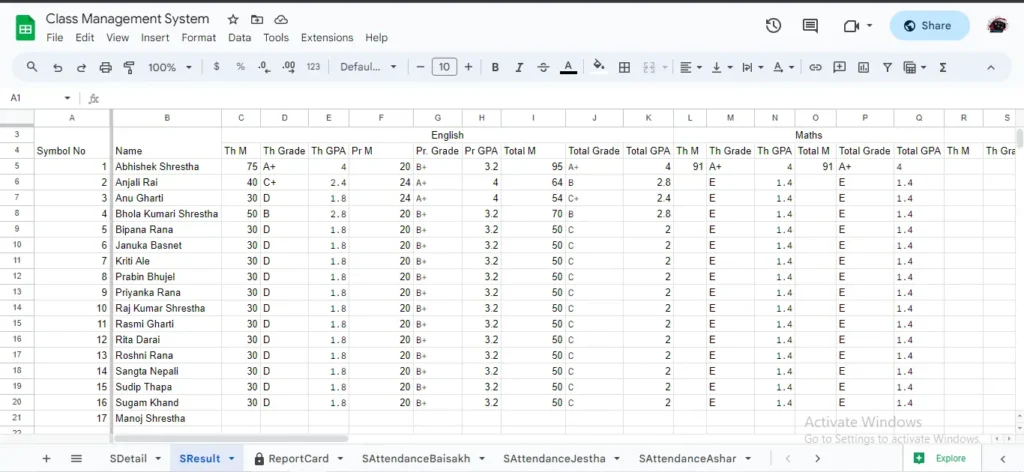
    The Student Management System also has a result management system embedded with it for the result-making process of students. Result management is more focused on the yearly examination rather than terminals or other examination systems. But as per your demand, we can increase its facilities to other examination systems too. By default, we have included some subjects like English, Math, Science, Social, Nepali, Optional-I, and Optional – II as a demo. 

    Marks Entry in School Management System
    Marks Entry

    Result Management System Features

    1. You can add theory and practical marks separately as per your needs. 
    2. This system is based on the modern GPA and Grade System. 
    3. You can get the total marks and percentage as an admin. 
    4. This system finds the rank of the students by comparing specific sets of students’ total marks in the result database. 
    5. The results also focus on the attendance calculation too. 

    Report Card Generation

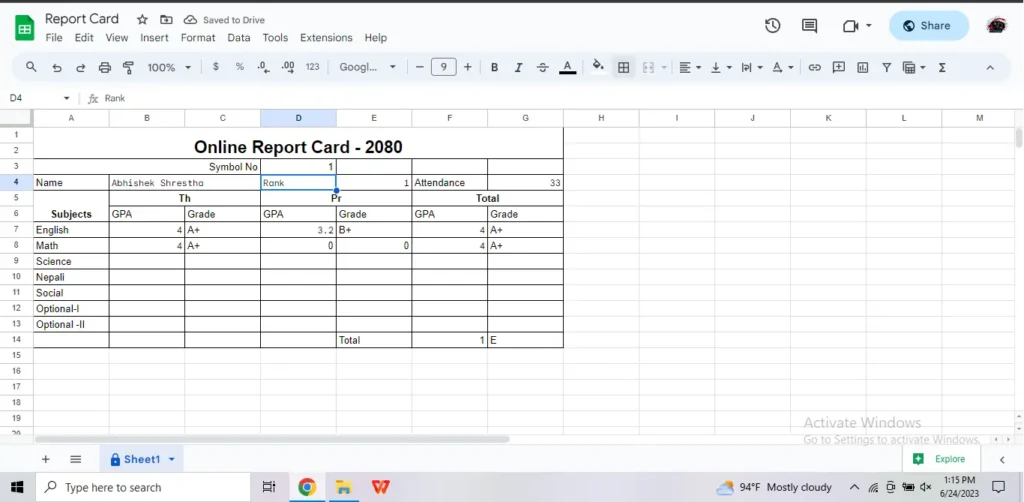
    One of the big issues that are faced during result management is the creation of report cards. This system also has a report card generation facility which could be provided to the students online too, where they will input their symbol number and can look up their report card dynamically. 

    View Result in School Management System
    View Result
    View Report Card in School Management System
    View Report Card

    Report Card Generation Features

    1. Report Cards can be delivered online like any other website. As SEE and NEB results are made available online, this system also makes the results of students available online. 
    2. Report Cards can be generated for a specific symbol number dynamically. 

    Student Attendance System

    The system does attendance for 12 months, starting from Baisakh to Chaitra. Similarly, you can see the total attendance at the end of every month and track your student’s attendance record in the class. 

    Simplified Baisakh Attendance
    Simplified Baisakh Attendance
    Simplified upto Chaitra Attendance
    Simplified upto Chaitra Attendance

    Student Attendance Features

    1. Attendance is based on a checkbox system which makes it easy to attend.

    Conclusion – School Management System

    School Management System is based on the digitalization of paper-based work and automatizing the work. The scope is to provide services for low-end schools, especially in the village areas. If you would like to develop this system, then we are here to hear your demand and provide the system into your hands. The price will be negotiable.

    You can check the report cards of dummy students over here: Dummy Report Card

    Frequently Asked Questions